Checking your Debt Settings on your Electricity Meter
To check your Prepayment Top Up History on the Electricity Meter
Checking your tari on your electricity meter
1. Go to your meter and hold OK button to access main menu
2. Press the OK button to go through the main menu options
3. Once Billing is displayed Press and hold OK button to enter
billing options
4. Press the OK button to cycle through Billing menu options
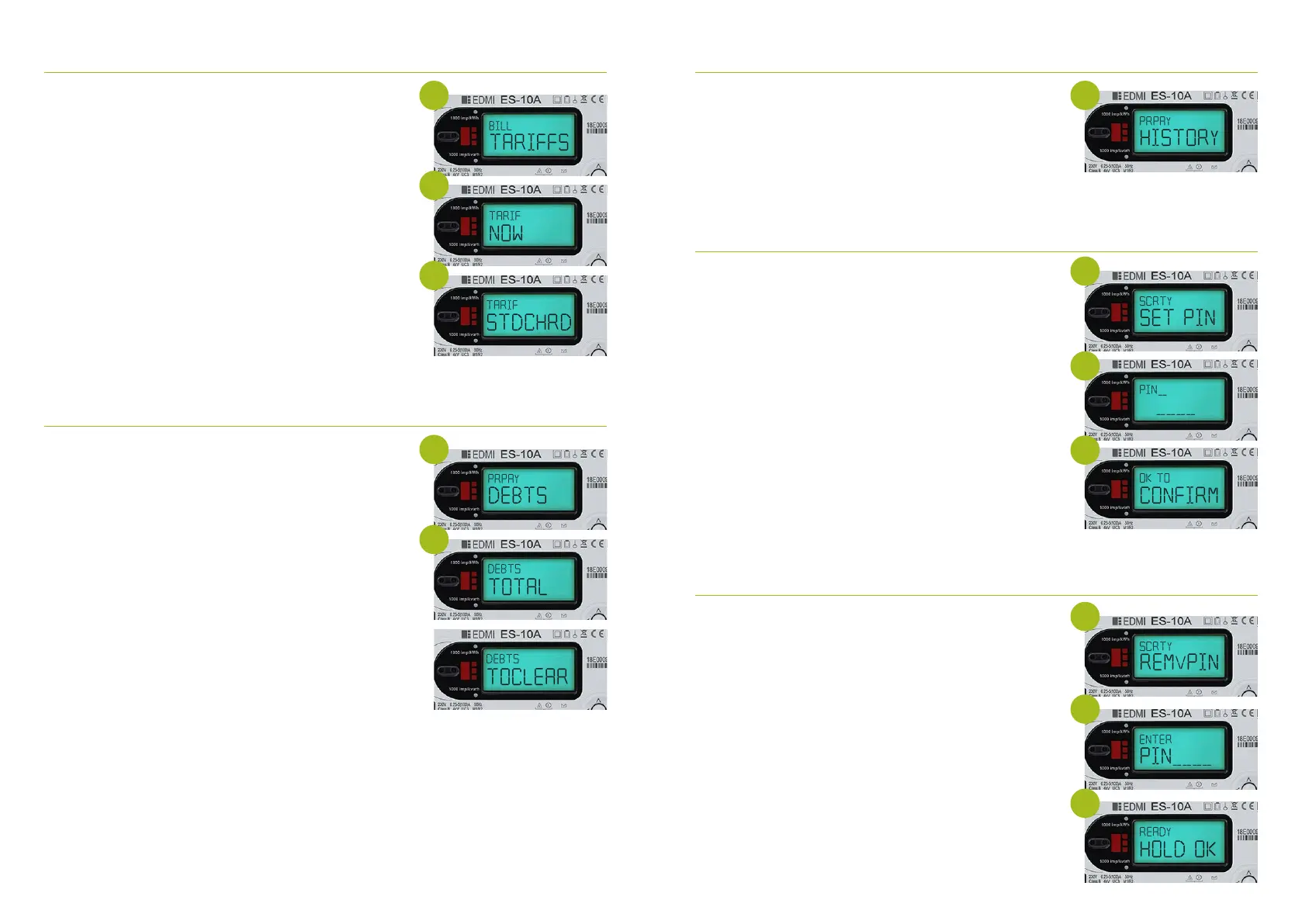
5. Once Bill taris is displayed Press and hold OK to view tari
information
6. Press and hold OK at ‘TARIF NOW’ which will provide you
with your current PRICE per KWH
7. Press Return button back to see TARIF NOW
8. Press OK and TARIF STDCHRD will show – Hold OK to
display daily standing charge
9. To return main menu press Return button twice to take
you back to Bill Taris screen
1. Press and hold the OK button to illuminate the meter
screen
2. Press and hold OK button to enter the main menu
3. Press the OK button to cycle through the menu options
until you arrive at PREPAY MENU
4. Whilst on the PREPAY menu Press and hold OK button to
enter the Prepay Menu
5. Press the OK button to cycle through the menu option
until your arrive at debts
6. Press and hold OK to select ‘Debts’
7. Press the OK button to cycle through the below options
- Debts total Press and hold OK to view total debt to clear
- Debts to clear Press and hold OK to view debt to clear
- Debts Timed Press and hold OK to view Debt 1 and
Debt 2 values
- Debts Payments Press and hold OK to view amount
to pay
- Debts AC.DEBT Press and hold OK to view Value to pay
Please note that your meter will still look to collect any agreed debt recovery set and daily
standing charge even when you are in your emergency credit. If your meter is o supply the
meter will collect the daily standing charge only. Please check the amount owed screen by
‘checking your debt setting section’ which will tell you what you need to repay to the meter to
cover any build of debt recovery rate or daily standing charge.
1. Press any button on the meter illuminate the display screen
2. Press and hold the OK button to access the meter menu
3. Press and hold the OK button to go through main menu
options
4. Once you have reached Prepay hold the OK button
5. Press OK to navigate to Prepay HISTORY Press and hold OK
to access your top up history
6. The dates will be displayed with values topped up
To set a security PIN on your Electricity Meter
This will protect certain information on the meter such as
meter balance, debt and tari information you will be required
to enter your PIN each time you want to access these screens.
1. Press any button on the meter illuminate the display screen
2. Press and hold the OK button to access the meter menu
3. Press and hold the OK button to go through main menu
options
4. Once you have reached SECURITY hold the OK button
5. SCRTY SET PIN will show
6. Press and hold OK button
7. You will then select your 4 digit pin by using the right or OK
button to navigate through the digits
8. To lock in the digit Press and hold OK
9. Once you have entered your desired PIN Press and hold OK
on the last digit to lock in PIN number
10. The message OK to CONFIRM will appear Press and hold
OK again to confirm this
11. PIN Saved will appear
To remove a security PIN on your electricity meter
1. Press any button on the meter illuminate the display screen
2. Press and hold the OK button to access the meter menu
3. Press and hold the OK button to go through main menu
options
4. Once you have reached SECURITY hold the OK button
5. SCRTY SET PIN will show
6. Press and hold OK button to go to REMV PIN screen
7. Press and hold OK on this screen
8. You will then be asked to enter previously chosen 4 digit pin
by using the right or OK button to navigate through the digits
9. To lock in the digit Press and hold OK
10. Once you have entered your desired PIN Press and hold OK
on the last digit to lock in PIN number
11. The message READY HOLD OK will appear Press and hold
OK again to confirm this
12. PIN RMVD message will appear
If you forget your PIN please contact us
5 5
5
6
11
8
6
8
6
7
7
10



 To Next Page