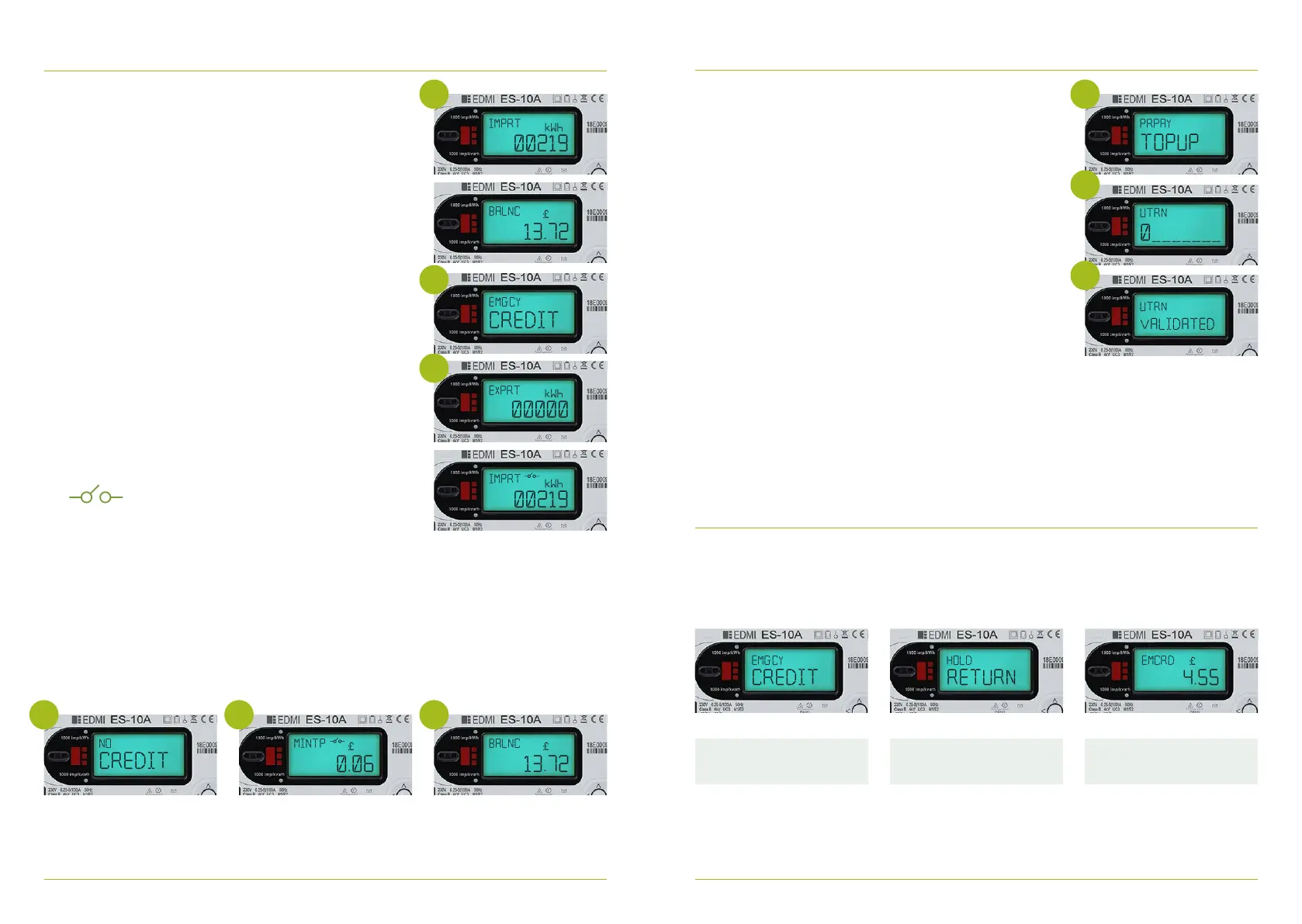
Checking your electricity balance Topping up on your meter using your UTRN
1. Press any button on the meter to illuminate the display
screen
2. If you have more than £1 credit balance on your meter you
will see the following screens rotate after you illuminate
the screen
a) IMPT- This is how many units of electricity you have
used on your meter, this is your meter reading
b) BALNC- This is how much credit you have on your
meter, you will also see this show on your IHD too
If your meter balance is under £1 in credit you will see the
following screen rotate after you illuminate the screen
a. IMPT- This is how many units of electricity you have
used on your meter, this is your meter reading
b. EMGCY Credit hold return (OK button) the meter is
advising that you can now access your emergency
credit by pressing and holding the return (OK)
button, this is because your balance is less than £1
c. Export - This is only relevant if you have solar panels
d. BALNC - This is how much credit you have on your
meter, you will also see this show on your IHD too
1. Press any button on the meter to illuminate the display
screen
2. Press and hold the OK button to access the meter menu
3. Press the OK button to go through main menu options
4. Once you have reached Prepay hold the OK button
5. Press the OK button until you reach TOP UP
6. Press and hold OK to allow you to proceed to top up your
UTRN
7. To enter your UTRN use the right hand button to select
your digit. Your UTRN number will be displayed on the app
or on the receipt you received at the Post Oce/Payzone
outlet.
8. Press and hold OK to lock in digit and move onto next digit
entry
9. If you make an error Press and hold the back arrow button
10. On your last digit entry Press and hold the OK button
submit your UTRN
11. ‘Please wait’ will be displayed before a message will appear
advising ‘UTRN VALIDATED’ or ‘UTRN NOT VALIDATED’
12. Following your UTRN entry if “UTRN NOT VALIDATED” is
displayed please re-enter your 20 digit UTRN ensuring all
digits are accurate. If you continue to see this message
please contact us.
Accessing the Emergency credit for Electricity on your Meter:
1- The display screen on your meter will show the message ‘EMGCY Credit’ Press and hold
return button to invoke your Emergency Credit
2- ‘MINTP‘ message may then show on the main screen and this will advise your minimum top
up needed to repay anything owed to the meter
Meter now shows
emergency credit
Holding return will now activate
your emergency credit
Showing you are now in
Emergency Credit
Please note if the meter is o supply
this icon will display.
please top up or activate your emergency
credit if available to re-enable your supply.
In this instance you will see the following screens rotate after you illuminate the screen,
a. IMPRT – KWH Screen
b. NO CREDIT
c. MINTP – Minimum Payment required to bring meter back on supply
d. EXPRT
e. NO CREDIT
f. MINTP
g. BALNC- this is the balance on your meter
2 5
7
11
b
b
g
c
c



 To Next Page