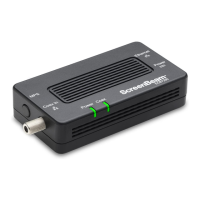
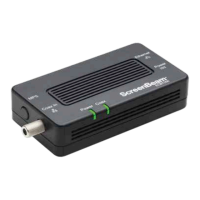
The ScreenBeam ECB6250 Bonded MoCA Network Adapter is a versatile solution designed to extend a home or office network by leveraging existing coaxial cabling. This adapter allows users to establish an Ethernet internet port wherever a coaxial connection is available, providing a simple and flexible way to expand network access without the need for new wiring.
Function Description:
The primary function of the ECB6250 is to convert an internet signal from a broadband modem or router into a MoCA (Multimedia over Coax Alliance) signal, which is then transmitted over the coaxial network. Conversely, it can receive a MoCA signal from the coaxial network and convert it back into an Ethernet signal for connected devices. This enables high-speed internet access in locations that might otherwise be difficult or costly to wire with Ethernet cables. The adapter supports MoCA 2.5, offering robust performance for demanding network applications.
Important Technical Specifications:
- Model Number: ECB6250 (MoCA 2.5 Network Adapter)
- IP: LAN MoCA (v. 2.5; up to 2.5 Gbps throughput), LAN Ethernet Port 10/100/1000 (1)
- LAN Connections: Coax In Frequency Range - Extended D-band: 1125MHz ~ 1675MHz
- LED Indicators: Power, Coax
- Power: External, 5V DC, 2A, 1.3 mm diameter connector plug (Made by APD, model #WB-10E05FU)
- Regulatory Compliance: FCC, UL 60950-1, CUL, IC
- Environmental Conditions:
- Ambient temperature: 0°C to 40°C (32°F to 104°F)
- Storage temperature: -20°C to 85°C (-4°F to 185°F)
- Operating humidity: 10% to 85% non-condensing
- Storage humidity: 5% to 90% non-condensing
Usage Features:
The ECB6250 is designed for ease of use, with a straightforward setup process.
- Package Contents: Each unit comes with the ECB6250 MoCA 2.5 Network Adapter, a coaxial cable, a power adapter, a Quick Start Guide, and an Ethernet cable.
- Requirements: Installation requires an available coaxial port and an available electrical wall socket in the desired installation areas.
- Connectivity: It features a 1.0 gigabit Ethernet port and a Coax In coaxial port (v. 2.5).
- LED Indicators: The device includes LED indicators for Power, Coax, and Ethernet status.
- Power LED: Glows solid green when the adapter is powered up.
- Coax LED: Glows solid green when there is a connection on the Coax port.
- Ethernet LEDs (2): Located on the upper right and left corners of the Ethernet port. The left LED glows green on connection, and the right LED blinks green when data is transferred across the port.
- First Adapter Setup: The initial adapter connects to the broadband modem/router and the coaxial network. This involves connecting a coaxial cable from a coaxial outlet to the adapter's Coax In port, an Ethernet cable from the modem/router's Ethernet port to the adapter's Ethernet port, and then plugging in the power adapter.
- Additional Adapter Setup: For extending the network to other areas, additional adapters can be installed. This process mirrors the first adapter setup: connect a coaxial cable from a coaxial outlet to the adapter's Coax In port, an Ethernet cable from the adapter's Ethernet port to the device needing internet access (e.g., computer, smart TV), and then plug in the power adapter.
- Coaxial Splitter Use: If a coaxial port is already in use by another device (like a set-top box), a 2-way coaxial splitter (not included) can be used. The existing coaxial cable from the wall outlet connects to the "In" port of the splitter. One "Out" port connects to the original device, and the other "Out" port connects to the ECB6250 adapter.
- MoCA Protected Setup (MPS): By default, MoCA encryption is disabled. To enable it, users can log into the adapter's firmware via a web browser (http://192.168.144.200) using "admin" as the username and "actiontec" as the password. Once enabled, the MPS push button on the adapter can be used to synchronize the encryption password across all connected MoCA 2.5 adapters.
Maintenance Features:
- Cleaning: The device should only be cleaned with a dry cloth.
- Ventilation: Do not block any ventilation openings to prevent overheating.
- Heat Sources: Avoid installing the adapter near heat sources such as radiators, heat registers, stoves, or other heat-producing apparatus like amplifiers.
- Water Exposure: Do not use the product near water (e.g., bathtub, kitchen sink, laundry tub, swimming pool, or in a wet basement).
- Power Cord and Batteries: Use only the power cord and batteries indicated in the manual. Batteries should be disposed of in fire-safe locations according to local codes.
- Coaxial Cable Shield: Ensure the coaxial cable screen shield is connected to the Earth at the building entrance per ANSI/NFPA 70, the National Electrical Code (NEC), in particular Section 820.93, "Grounding of Outer Conductive Shield of a Coaxial Cable," or in accordance with local regulation.
- Troubleshooting: The user guide provides basic troubleshooting information, and further support, firmware updates, and FAQs are available on the ScreenBeam retail support website (retailsupport.screenbeam.com).
- Warranty: The product comes with a one-year Limited Hardware Warranty and 90-day free software updates from the date of purchase. Specific legal rights may vary by region.
The ScreenBeam ECB6250 is a reliable and efficient solution for expanding network coverage within a home or office environment, leveraging existing coaxial infrastructure to deliver high-speed internet connectivity.

 Need help?
 General

 To Next Page