Need help?
Do you have a question about the ScreenBeam ECB6250 and is the answer not in the manual?
Overview of the ScreenBeam ECB6250 MoCA 2.5 Network Adapter and its purpose in extending home networks.
Lists all items included in the ECB6250 MoCA 2.5 Network Adapter package.
Outlines the necessary coaxial port and electrical wall socket for installation.
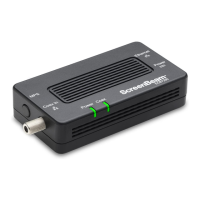
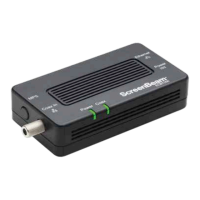
Details the adapter's Ethernet port, Coax In port, MoCA Protected Setup, and LED indicators.
Step-by-step guide to connect the initial MoCA adapter to the modem/router and coaxial network.
Instructions for enabling MoCA encryption, including login URL and synchronization method.
Procedures for connecting the adapter when the coaxial port is already in use by another device.
Steps to install further adapters for extending Ethernet access to different locations.
Details the product's one-year Limited Hardware Warranty and 90-day software updates.
Explains customer legal rights and how local laws may affect warranty terms.
Basic safety precautions to reduce risks of fire, electrical shock, and personal injury.
Information on FCC compliance for Class B digital devices and potential interference mitigation.
Provides resources for product support, updates, troubleshooting, and contact phone numbers.
The ScreenBeam ECB6250 MoCA 2.5 Network Adapter is a versatile and straightforward solution designed to extend and enhance a home or office network by leveraging existing coaxial cabling infrastructure. This adapter transforms any coaxial connection into a high-speed Ethernet Internet port, providing a flexible way to bring wired network access to areas where running new Ethernet cables might be impractical or costly. The device is particularly useful for establishing a robust and reliable network backbone for demanding applications such as online gaming, 4K video streaming, and large file transfers, without the need for extensive wiring.
The primary function of the ScreenBeam ECB6250 is to create a MoCA (Multimedia over Coax Alliance) network over your home's coaxial wiring. MoCA technology uses the same coaxial cables that deliver cable TV or satellite signals to transmit high-speed data, without interfering with your existing services. This means you can have both your TV and a high-speed internet connection running over the same cable simultaneously. The ECB6250 supports MoCA 2.5, which offers significantly higher throughput compared to earlier MoCA standards, enabling speeds up to 2.5 Gbps.
To establish this network, one ECB6250 adapter is connected to your broadband modem or router and to a coaxial outlet. This "first adapter" takes the Internet signal from your modem/router and injects it into your home's coaxial network. Once the signal is on the coaxial network, additional ECB6250 adapters can be placed in other rooms or areas where you need an Ethernet Internet connection. Each additional adapter connects to a coaxial outlet in that location and provides an Ethernet port to which you can connect devices such as smart TVs, gaming consoles, desktop computers, or Wi-Fi access points. This creates a wired network connection that is often more stable and faster than Wi-Fi, especially over longer distances or through walls.
The adapter features a 1.0 gigabit Ethernet port, ensuring that connected devices can take full advantage of high-speed internet connections. The "Coax In" coaxial port is designed for MoCA 2.5, supporting the extended D-band frequency range for optimal performance.
The ECB6250 is designed for ease of use, making network extension accessible even for users with limited technical expertise. The setup process involves a few simple steps:
Connecting the First Adapter:
Connecting Additional Adapters:
Coaxial Splitter Usage: If a coaxial port is already in use by another device (e.g., a set-top box), you can use a 2-way coaxial splitter (not included) to share the connection. The splitter allows both the existing device and the ECB6250 adapter to connect to the same coaxial outlet. The setup involves disconnecting the existing coaxial cable from the device, connecting it to the "In" port of the splitter, and then using two new coaxial cables to connect the splitter's "Out" ports to the existing device and the ECB6250 adapter, respectively.
MoCA Protected Setup (MPS): The ECB6250 includes MoCA Protected Setup (MPS) functionality. By default, MoCA encryption is disabled to simplify initial setup and ensure devices can easily discover each other. However, for enhanced network security, users can enable MPS. This involves logging into the adapter's firmware via a web browser using a specific IP address (http://192.168.144.200). Once logged in with the default credentials (username "admin", password "actiontec"), you can enable MoCA encryption. After enabling, the MPS push button on the adapter can be used to synchronize the encryption password across all MoCA 2.5 adapters connected via coaxial cable, securing your network.
LED Indicators: The adapter features several LED indicators to provide visual feedback on its status:
The ScreenBeam ECB6250 is designed for minimal maintenance, focusing on reliability and long-term performance.
Software Updates: While not a frequent requirement, ScreenBeam provides firmware updates for the adapter. These updates can introduce new features, improve performance, or address security vulnerabilities. Users are encouraged to check the ScreenBeam support website (retailsupport.screenbeam.com) for the latest firmware updates and instructions on how to apply them. Keeping the firmware updated ensures optimal performance and compatibility.
Cleaning: The device should be cleaned with a dry cloth only. Avoid using liquids or harsh chemicals, as these can damage the internal components or the exterior finish. Regular dusting can help prevent dust buildup in ventilation openings, ensuring proper airflow and preventing overheating.
Troubleshooting: In case of connectivity issues, the LED indicators serve as a primary diagnostic tool. If the Power LED is off, check the power connection. If the Coax LED is not solid green, there might be an issue with the coaxial connection or the MoCA network itself. If the Ethernet LEDs are not indicating a connection or data transfer, check the Ethernet cable and the connected device. The ScreenBeam support website also offers troubleshooting guides and FAQs to help resolve common issues.
Safety Precautions: Adhering to important safety instructions is crucial for the longevity of the device and user safety. These include:
The ECB6250 is a robust and user-friendly device that simplifies the expansion of wired network access within a home or office, making it an excellent choice for those seeking a high-performance and reliable alternative to Wi-Fi in specific locations. Its straightforward setup, clear indicator lights, and minimal maintenance requirements contribute to a hassle-free user experience.
 General
| Brand | ScreenBeam |
|---|---|
| Model | ECB6250 |
| Category | Adapter |
| Frequency Bands | 2.4 GHz and 5 GHz |
| Wi-Fi Speed | AC1200 |
| Antenna | Internal |
| Maximum Data Rate | 1200 Mbps |
| Ports | 1 x Gigabit Ethernet |
| Security | WPA2 |
| Operating Modes | Client mode |


 To Next Page