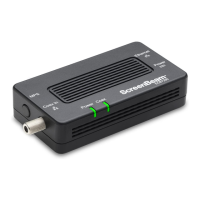
If necessary, additional Adapters can be placed at locations around the
home or office that need an Ethernet Internet connection, but currently only
have a coaxial port.
To connect additional Adapters:
1. Connect a coaxial cable to a nearby coaxial outlet.
2. Connect the other end of the coaxial cable to the Coax In coaxial port
on the side of the Adapter.
3. Connect one end of an Ethernet cable to the Ethernet port of the
modem/router.
4. Connect the other end of the Ethernet cable to the Ethernet port
on the side of the Adapter.
5. Plug the provided power adapter into the Power port on the side
of the Adapter.
6. Plug the other end of the power adapter (external, 5V DC, 2A,
made by APD, model #WB-10E05FU) into an electrical outlet.
7User Guide | Bonded MoCA Network Adapter | Model # ECB6250
Connecting the Adapters



 To Next Page