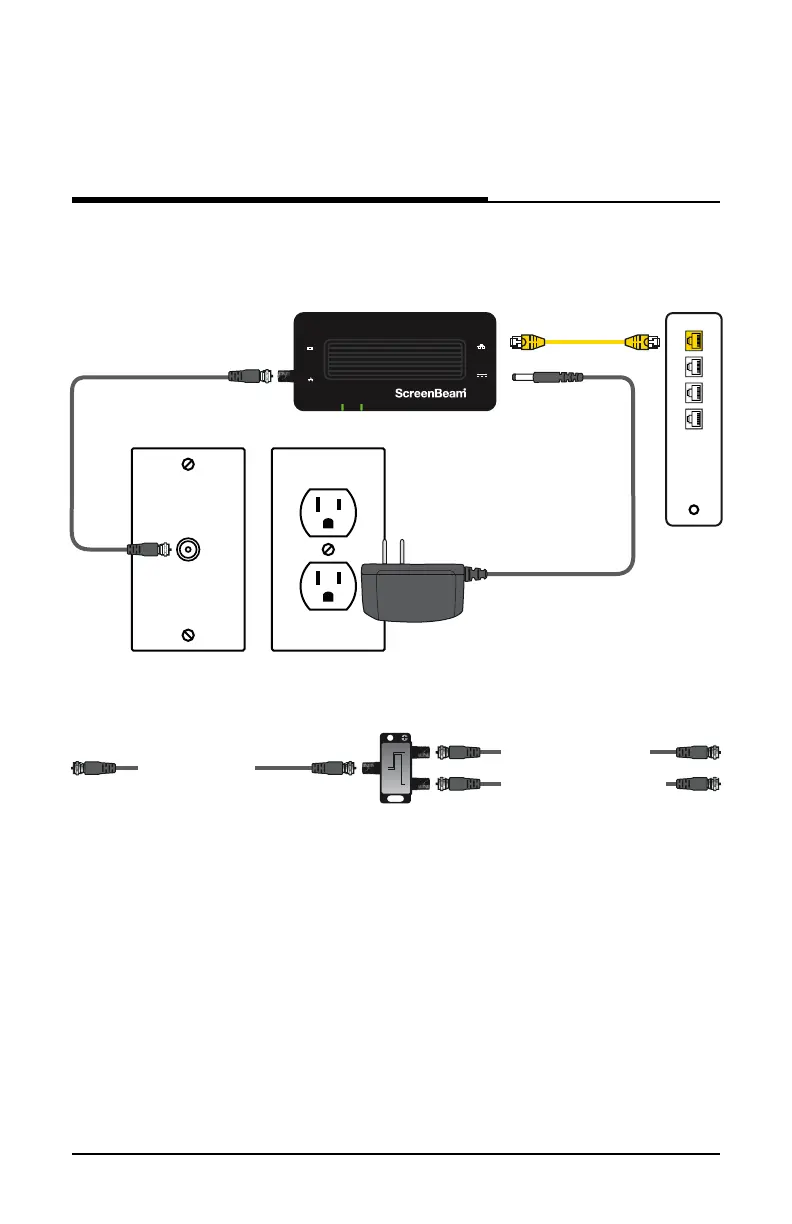
When complete, the setup should look similar to the figure below:
The Internet signal is now being delivered across the coaxial network.
MoCA Protected Setup (MPS)
By default, MoCA encryption is disabled to ensure that the individual
devices can “see” each other. If you would like to enable MPS, you
will need to login to the firmware loaded on the Adapter. To do this,
enter the following URL in a web browser on a computer connected
via Ethernet to the Adapter:
http://192.168.144.200
5User Guide | Bonded MoCA Network Adapter | Model # ECB7250
Connecting the Adapters
Coaxial Cable
Ethernet Cable
Power Outlet
Coaxial Outlet
Power Adapter
Ethernet Port
of Modem/
Router
To Coax In Port on ECB7250
To Coaxial Port on Device
From Coaxial Outlet
2-Way Splitter
IN
2-WAY SPLITTER
OUTOUT
If Coaxial Port is Being Used buy Another Device:
Ethernet
Power
Power
Coax
Coax In
ECB7250
MPS


 To Next Page