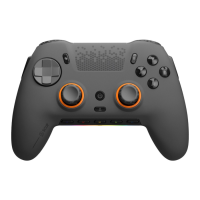
SCUF Envision | 2 Quick Start Manual | English
To use Envision,
you must rst
download iCUE.
www.scuf.co/downloads
CONNECTING TO iCUE:
Please note, before using the controller, you will need
to download and install the Envision software on the
device that the controller will be used on.
To download & install the Envision software, please
open iCUE & plug your controller into your device
via USB-C cable. iCUE will detect the controller and
automatically download & install the software. It is
recommended to restart your PC after the software
has been installed.
iCUE:
Take your Envision customization even further with
Corsair’s iCUE software on Windows. The iCUE
software enables dynamic RGB lighting control,
controller remapping, and the ability to tune your
thumbsticks and triggers.
In addition, iCUE allows macro programing, sync
lighting eects with other Corsair devices, and
exclusive iCUE integrations with select games that
sync your controller’s lighting with scenes in the
game, providing a more immersive experience.


 To Next Page