Need help?
Do you have a question about the SCUF Vantage 2 and is the answer not in the manual?
Details the function, access, and customization of Sax Buttons.
Details on swapping and customizing thumbsticks for grip and control.
Explains how to use the remapping switch to configure paddles and Sax Buttons.
Details on removing vibration modules to reduce weight and disable vibration.
Instructions for pairing and connecting the controller via wireless or wired modes.
Steps to connect and use the controller in wired USB mode.
Steps to connect and use the controller wirelessly via Bluetooth.
Instructions on how to charge the SCUF Vantage controller.
Instructions for setting up and connecting the controller in wired mode.
Explains the function and customization of the paddle control system.
Details the function, access, and customization of Sax Buttons.
Explains how to use the remapping switch to configure paddles and Sax Buttons.
Overview of the trigger system, including adjustable triggers, stops, and covers.
Instructions on how to adjust trigger tension for faster response time.
Explains how to adjust trigger stops to reduce latency.
Information on removing and replacing trigger covers for comfort and accuracy.
Details on swapping and customizing thumbsticks for grip and control.
Information on swapping and replacing anti-friction rings for smooth thumbstick glide.
How to install and remove the interchangeable D-pad and Control Disc.
How to customize controller style by swapping the magnetic faceplate.
Details on removing vibration modules to reduce weight and disable vibration.
How to use the audio touch bar for volume control and muting.
Information about the audio jack port for headset compatibility.
Instructions on how to press the reset button using the SCUF Key.
Information on using the protection case to prevent damage.
Details on the USB cable for charging and wired play.
Guide on how to register the SCUF Vantage controller online.
Information regarding the 6-month limited warranty for the product.
Details for technical assistance, warranty, and general inquiries.
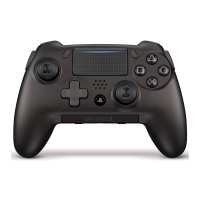
This document describes the SCUF Vantage 2 controller, a highly customizable gaming peripheral designed to enhance speed and gameplay for PlayStation 4 users. Unlike standard controllers, the Vantage 2 offers extensive personalization options to fit individual needs and play styles.
The SCUF Vantage 2 is available in both wireless/wired (Bluetooth™/USB) and wired-only models. To get started, users are advised to visit scuf.co/setup to set up their controller, update its firmware, and download any additional software.
The SCUF Vantage 2 controller is engineered to provide a competitive edge by allowing players to utilize more of their hands, thereby shortening response times during gameplay. Its core functionality revolves around a suite of customizable features that cater to diverse gaming preferences.
For wireless/wired models, initial pairing with a PS4™ system is required. This involves turning on the PS4™, sliding the Wireless/Wired Switch to the right (Bluetooth™), and then, using an already connected controller, navigating to Settings > Devices > Bluetooth™ Devices. Users then press the PS Button on the SCUF Vantage to activate it, and simultaneously press and hold the Share Button and PS Button until the Light Bar flashes. The controller should then appear in the device list as "SCUF Controller." Once selected and confirmed, the LED on the SCUF Vantage will illuminate for 3 seconds before turning off, indicating successful pairing. If pairing fails, the process can be repeated. Sliding the mode switch to USB during pairing will exit pairing mode. For users without another connected controller, the PlayStation™ Second Screen Application can be used on a smartphone. Holding the Share and PS buttons simultaneously after pairing will delete the existing pairing.
For wired play, users slide the Wireless/Wired Switch to the left (USB), connect the Micro-USB cable to the controller and a USB port on the PS4™ console, then press the PS Button on the SCUF Vantage to activate it. Wired-only models follow a similar procedure, omitting the wireless switch.
The SCUF Vantage Controller should be charged via the PS4™ System. Connecting the Micro-USB cable to the controller and a USB port on the PS4™ System will initiate charging. When the controller is not in use and charging, the light bar will turn orange. Expected charge time is approximately 2.5 hours, providing up to 20 hours of battery life. If the Removable Vibration Modules are active, battery life may decrease. For playing while charging, users should switch to Wired mode.
The four paddles on the back of the controller allow for increased hand utilization and faster response times. These paddles can be mapped to various buttons or controller functions, including triggers and the Touch Pad click.
Located on the sides of the controller, Sax Buttons are intuitively accessed by extending the index finger, reducing finger travel. Like the paddles, Sax Buttons can be mapped to buttons or controller functions, including triggers and the Touch Pad click.
A Remapping Switch on the rear of the controller allows for on-the-fly configuration of the Paddle Control System (P1, P2, P3, P4) and Sax Buttons (S1, S2). Users can remap any paddle or Sax Button to one of fifteen functions: Δ, Ο, X, □, Left D-pad, Right D-pad, Up D-pad, Down D-pad, R1, R2, R3, L1, L2, L3, or Touch Pad click. To remap, slide the switch to the right (Remapping mode), press and hold the desired paddle or Sax Button, then simultaneously press and hold the controller function or button to map it to. Release the button/function, then the paddle/Sax Button. Slide the switch back to the left (Play Mode) to save. Paddle or Sax Button mapping can be cleared by remapping to the Share, Options, or PS Button.
This system reduces latency and optimizes triggers for different hand sizes and play styles. It comprises three modules:
SCUF Thumbsticks offer a larger surface area for improved grip, accuracy, and control. The Vantage 2 includes multiple lengths and shapes that are interchangeable to suit hand size and gamestyle.
These rings are made from high-grade self-lubricating materials, providing a pro-grade finish that allows thumbsticks to glide smoothly on contact. They are swappable and replaceable.
The D-pad provides quick access to single-direction bias. The Control Disc can transform the D-pad into a control system similar to a thumbstick, improving comfort and making diagonals easier to activate.
This feature allows quick access to audio settings. Swiping left lowers volume, and swiping right raises it. Holding the Audio Touch Bar mutes the headset microphone. Note that Vantage's audio functionality is compatible only in Wired (USB) mode.
Ensures proper headset function, requiring a headset equipped with a 3.5mm jack plug.
These modules can be removed to significantly reduce controller weight and disable vibration in the handles, based on player preference.
Allows for customization of the controller's style.
Positioned beneath the faceplate on the right side, the Reset Button can be pressed using the provided SCUF Key (0.9mm).
The controller comes with a SCUF Vantage Protection Case (for wireless/wired models only) to prevent accidental damage when not in use, and a 10ft High Speed Braided Micro-USB Cable for charging or wired play.
To access the adjustable screw, lift the lip of the Trigger Cover straight up. Insert the SCUF Key (0.9mm) into the screw. Turn clockwise to tighten and counterclockwise to loosen. To return to standard operation, turn counterclockwise until the screw is flush with the top of the trigger body. Replace the Trigger Cover by pushing the trigger down, snapping the top part first, then the bottom. A "click" indicates it's secured.
To remove, lift the lip of the Trigger Cover straight up to separate it from the trigger body. To replace, push the trigger down, snapping the top part of the cover on first, then the bottom. A "click" confirms it's secured.
First, remove the faceplate by lifting it from the controller chassis using the two finger notches on the handles. Lift the current thumbstick off its shaft. Align the new thumbstick with the shaft and press firmly. Align the faceplate with the controller and push to secure; magnets will "click" into place. The tail of the SCUF logo on the thumbstick should be positioned at the bottom left.
Remove the faceplate as described for thumbsticks. To remove a ring, push it from the inside of the front faceplate until it releases. To place a new ring, push it into place from the front side, aligning the teeth. Realign the faceplate with the controller and push to secure; magnets will "click" into place.
To install, pull the D-pad away from the controller and position the Control Disc in its place; magnets will hold it. To remove, pull the Control Disc away from the controller. The tail of the SCUF logo on the Control Disc should be positioned at the bottom left.
The interchangeable magnetic faceplate can be removed by lifting it from the controller chassis using the two finger notches on each side of the handles.
These modules can be removed to reduce weight and disable vibration. The manual does not detail the specific removal process but implies they are user-removable.
The Reset Button, located beneath the faceplate on the right side, can be pressed using the provided SCUF Key (0.9mm) to reset the controller.
The SCUF Vantage 2 is designed for gamers who seek a highly personalized and performance-driven controller experience, offering extensive customization and ergonomic benefits to suit various play styles and preferences.
 General
| Audio | 3.5mm audio jack |
|---|---|
| Type | Gamepad |
| Platform Compatibility | PlayStation 4, PC |
| Connectivity | Wired (USB), Wireless (Bluetooth) |
| Customization | Interchangeable thumbsticks |
| Features | Adjustable triggers |

 To Next Page