Need help?
Do you have a question about the SCUF Envision and is the answer not in the manual?
Guide on downloading and installing the iCUE software for controller setup.
Details the benefits of using iCUE for RGB lighting, remapping, and tuning.
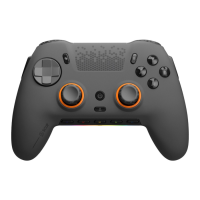
Identifies major physical parts like thumbsticks, paddles, buttons, and ports on the controller.
Instructions on how to charge the Envision controller using the USB-C cable.
Explains the Power LED color indications for battery status and charging.
Details how to connect the controller via wired and wireless modes for Envision and Envision Pro.
Explains the functionality and customization of the controller's remappable paddles.
Guides on how to remap paddles and SAX buttons using the Profile Button.
Instructions on how to reset the controller using the reset button.
Details the functionality of the two side-action buttons and their removability.
Explains the standard and Pro triggers, including trigger stops and digital triggers.
Explains the functionality and customization of the G Keys on the controller.
Guides on customizing thumbsticks, D-Pad, and faceplates without software.
Provides guidance on choosing and swapping thumbsticks based on game genre.
Details the 1-year limited warranty and where to find more information.
Provides contact information for technical assistance and general inquiries.
Numbered steps with diagrams for safely removing the controller battery.
Encourages recycling of electronic hardware and batteries according to local laws.
Step-by-step diagrams illustrating how to remove controller paddles.
Advice for new users on how iCUE detects and updates devices.
Steps to begin configuring the controller with iCUE and USB mode.
Explains the iCUE home screen layout and device display.
Guides on selecting the SCUF Envision module to configure controller settings.
Explains the controller mapping section in iCUE for custom configurations.
Step-by-step guide on creating custom button mappings in iCUE.
Instructions to ensure the controller image reflects the desired button remapping in iCUE.
Notes on restrictions for remapping specific buttons like 'A' and 'B' in iCUE.
Explains hardware mappings, which are controller settings when iCUE is not running.
Guides on saving custom hardware mappings to onboard controller profiles.
Details restrictions on remappable buttons and functions in hardware mappings.
Step-by-step instructions to save profiles from iCUE to the controller's onboard memory slots.
A reference table linking profile slot numbers to their associated profile colors.
Explains how to customize LEDs on the G-Key panel and LED Bar using iCUE.
Notes that iCUE must be running for desired lighting effects to display.
Guides on configuring trigger behavior using presets or custom curve responses.
Instructions on adjusting trigger deadzones and potential implications of low deadzones.
Guides on configuring thumbstick behavior using presets or custom curve responses.
Instructions on adjusting thumbstick deadzones and potential implications.
Explains how to adjust vibration intensity using presets or custom sliders in iCUE.
Notes on the "Sync" button mirroring left and right vibration sliders.
Covers checking for updates, battery status, brightness, and sleep/eco modes.
Instructions for pairing or re-pairing the wireless receiver.
Guides on viewing, setting, or resetting onboard memory profiles.
Explains how to use saved onboard profiles or default controller settings.
Instructions on how to properly quit the iCUE application from the taskbar.
 General
| Connectivity | Wired |
|---|---|
| Platform | PC |
| Back Paddles | 4 |
| Connection | USB |
| RGB Lighting | Yes |

 To Next Page