SCUF Envision | 18 Quick Start Manual | English
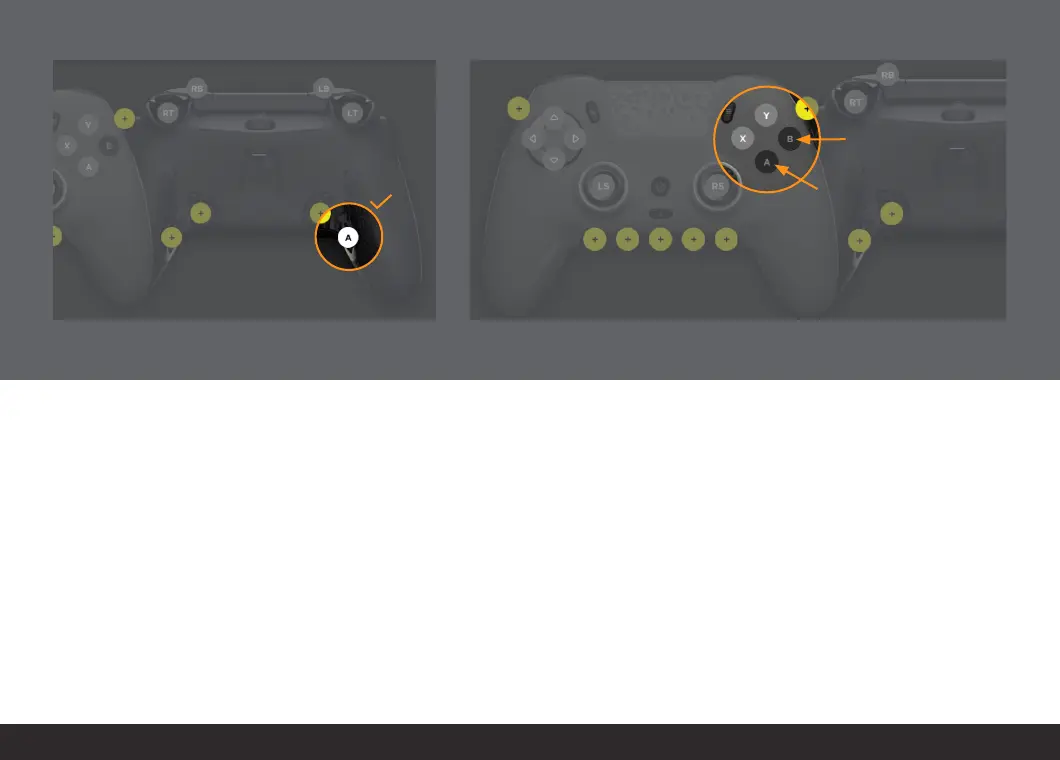
Ensure that the controller image reflects the mapping
you want.
Now you have successfully remapped your function to
another button.
iCUE allows you to remap and change virtually any button or trigger
on your controller within the mappings section. The controller images
show what functions can be changed and are highlighted in yellow
and light gray. Buttons highlighted in yellow do not have a default
function. Buttons highlighted in light gray have a default function that
you can overwrite by remapping them.
Please note that you cannot change the “A” and “B” buttons unless the
“A” and “B” functions are mapped somewhere else on the controller.
The “A” and “B” functions are critical to the majority of games for
selecting or going back within menus. As a safety precaution, we
have locked those buttons until you remap those functions to another
button.


 To Next Page