SCUF Envision | 17 Quick Start Manual | English
MAPPINGS:
The mappings section represents the mappings of the controller while
iCUE is running.
There is a list of preset mappings that you can choose from to use or
reference from when creating custom mappings.
Please note that the preset mappings, in iCUE, will differ from the out-
of-the-box starter mappings that come pre-loaded on your controller.
Additionally, settings will not be applied
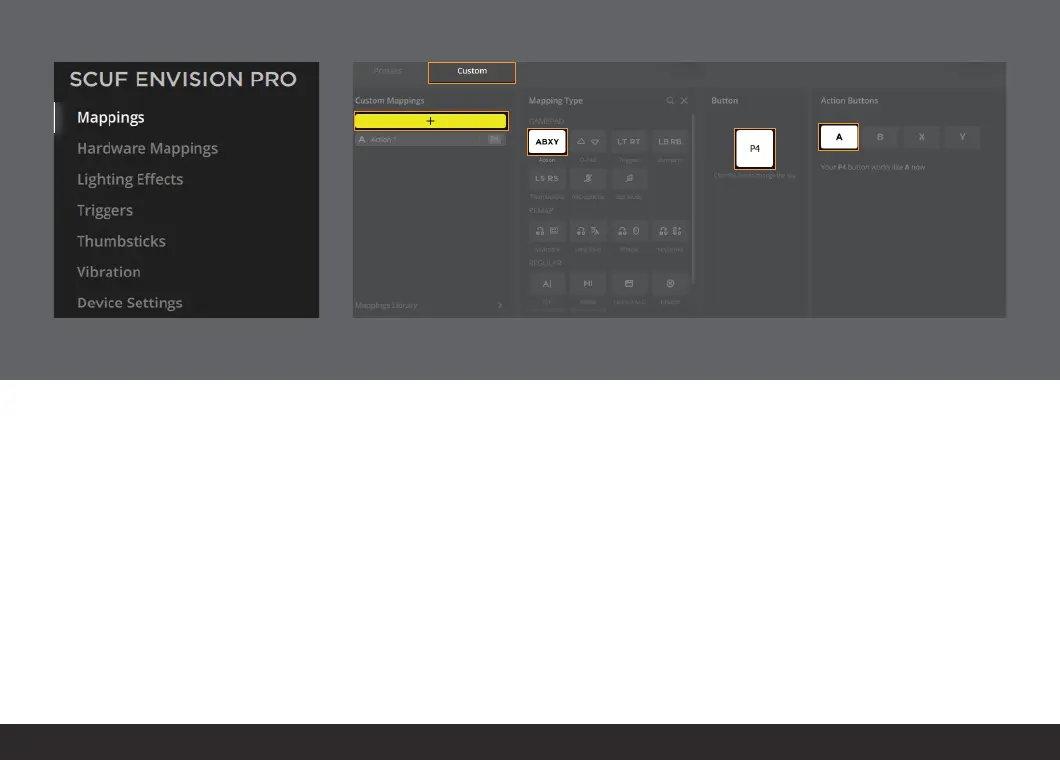
1. To create a custom mapping, select the “Custom” tab.
2. Press the yellow “+” button to open up the “Mapping Type” menu.
3. Select the mapping type you want to use.
4. Select the button that you want to change.
5. Select the function you want to map to your selected button.
1.
2.
3.
4.
5.


 To Next Page