SCUF Envision | 19 Quick Start Manual | English
Hardware Mappings represent the mappings of the controller when
iCUE is not running.
Please note the controller must be connected to PC via USB-C cable
and in wired mode to edit onboard profiles and save profiles to the
controller.
Just like the mappings section, there is a list of preset mappings that
you can choose from to use or reference from when creating custom
mappings.
Please note that the preset mappings, in iCUE, will differ from the out-
of-the-box starter mappings that come pre-loaded on your controller.
To create a custom hardware mapping, please follow the same steps
found in the mappings section.
Please note that unlike the “Mappings” section, you are limited to
what buttons can be remapped and what functions are remappable.
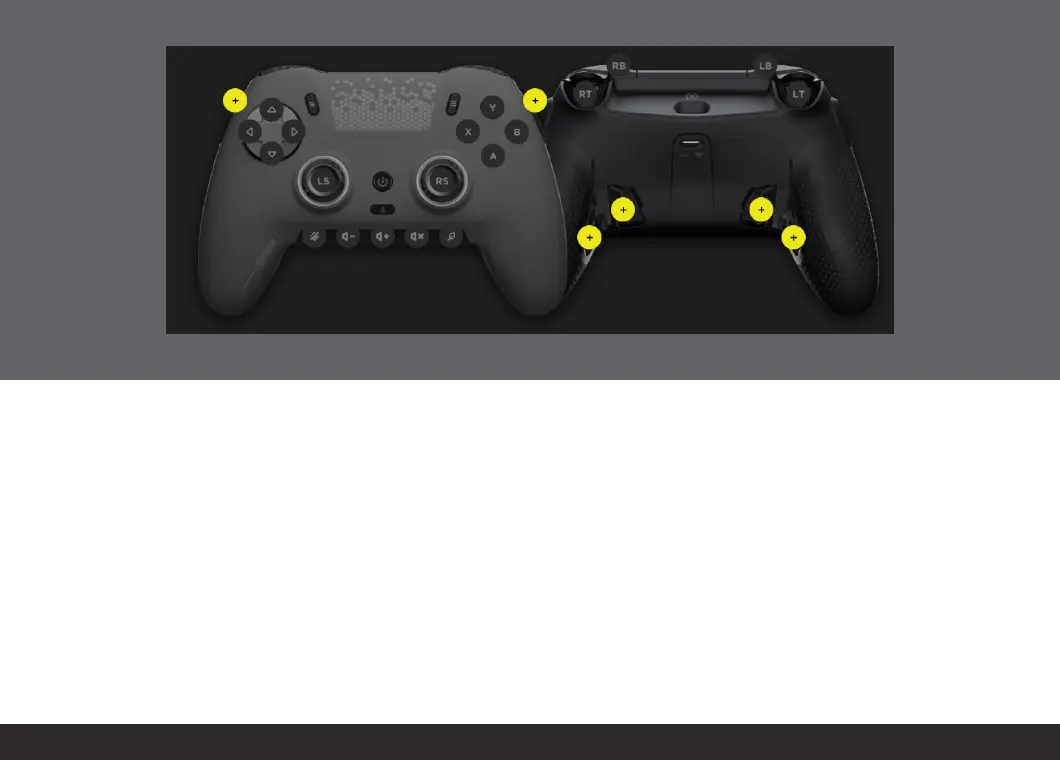
Only the Paddles and SAX buttons can be configured within the
Hardware Mappings section and all non-controller functions such as
macros, launching applications, etc., are not available to be mapped.
All configurable buttons are highlighted in yellow.
Be sure to save your hardware mappings to one of the on-board
profiles on your controller so that you can use your favorite layout
without iCUE running.
HARDWARE MAPPINGS & SAVING PROFILES TO YOUR CONTROLLER:


 To Next Page