SCUF Envision | 20 Quick Start Manual | English
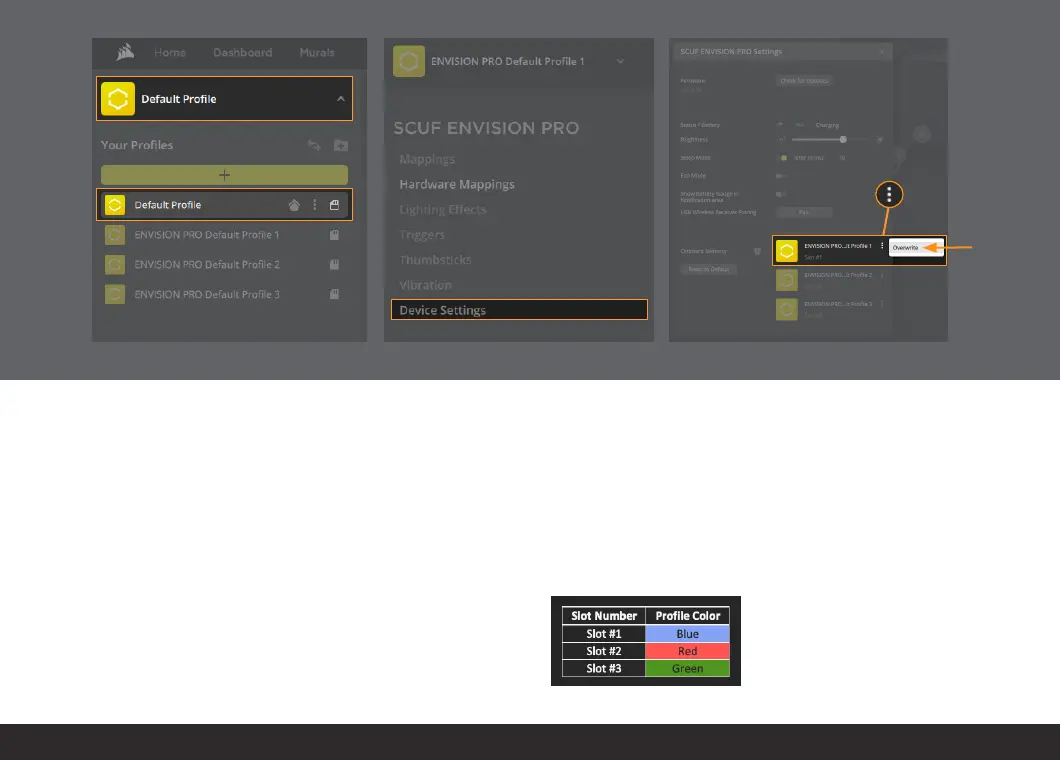
TO SAVE YOUR PROFILE TO YOUR CONTROLLER:
1. Select the drop down menu.
2. Choose the profile you want to save to your controller.
3. Select Device Settings.
4. Press the three dots next to the Slot # you want to save your profile
to and select “Overwrite.”
Now your profile has been saved to your controller.
Please note that Lighting Effects settings will not be saved and applied
to the controller when iCUE is not running (settings such as response
curves, deadzones, mappings, etc. will be saved).
Below is a reference table to show what “Slot #” is associated with what
profile color.
1.
2.
3.
4.
4.


 To Next Page