SCUF Envision | 9 Quick Start Manual | English
For all our game specific recommended layouts, please visit: scufgaming.com/gaming
n
First press the Profile Button until you see the color profile you
want to change.
n
Next, press the Profile Button again, but continue to hold it until
the light starts to blink.
n
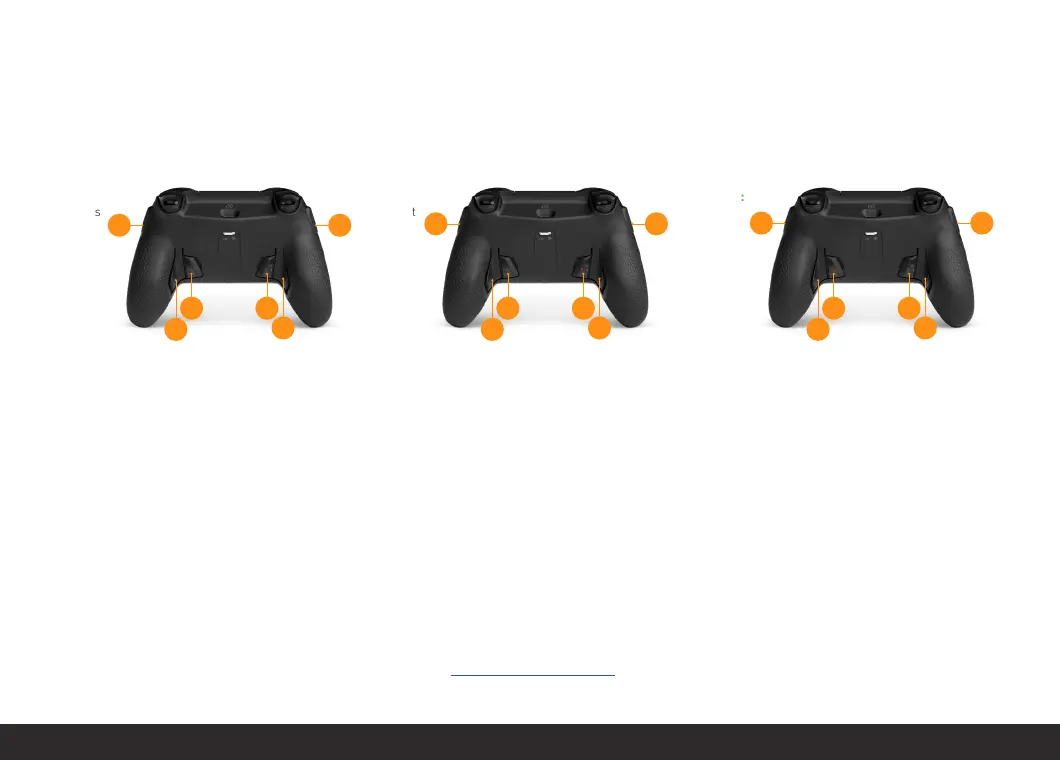
Now you can remap any paddle by simultaneously pressing the
paddle and the button you would like to remap it to. After a successful
pair, the RGB Lighting Strip will turn white and the controller will
vibrate.
n
To save your remapped configuration, simply press the Profile
Button. The Profile Indicator light will stop blinking.
Please note:
n
The inside paddles can be removed by using the provided
removal tool.
n
The SAX buttons and Paddles can be mapped to your choice of
RB/LB, RT/LT, R3/L3, the entire D-Pad or any of the
four Action Buttons. Mapping any paddle or SAX button to the Menu
button will blank that paddle or SAX button out.
n
To reset the controller, press the reset button using a long thin object
such as a paper clip. Please note that the reset button will recover the
controller in the event the controller becomes stuck. The reset button
will not reset profiles.
RED:
Sport
GREEN:
Racing
BLUE:
Shooters
B
Y
A
X
LBRB
B
A
D-PAD
RIGHT
D-PAD
LEFT
XY
D-PAD
RIGHT
D-PAD
DOWN
D-PAD
UP
D-PAD
LEFT
AB
Ready to create your own configuration?


 To Next Page