SCUF Envision | 10 Quick Start Manual | English
Extra moves.
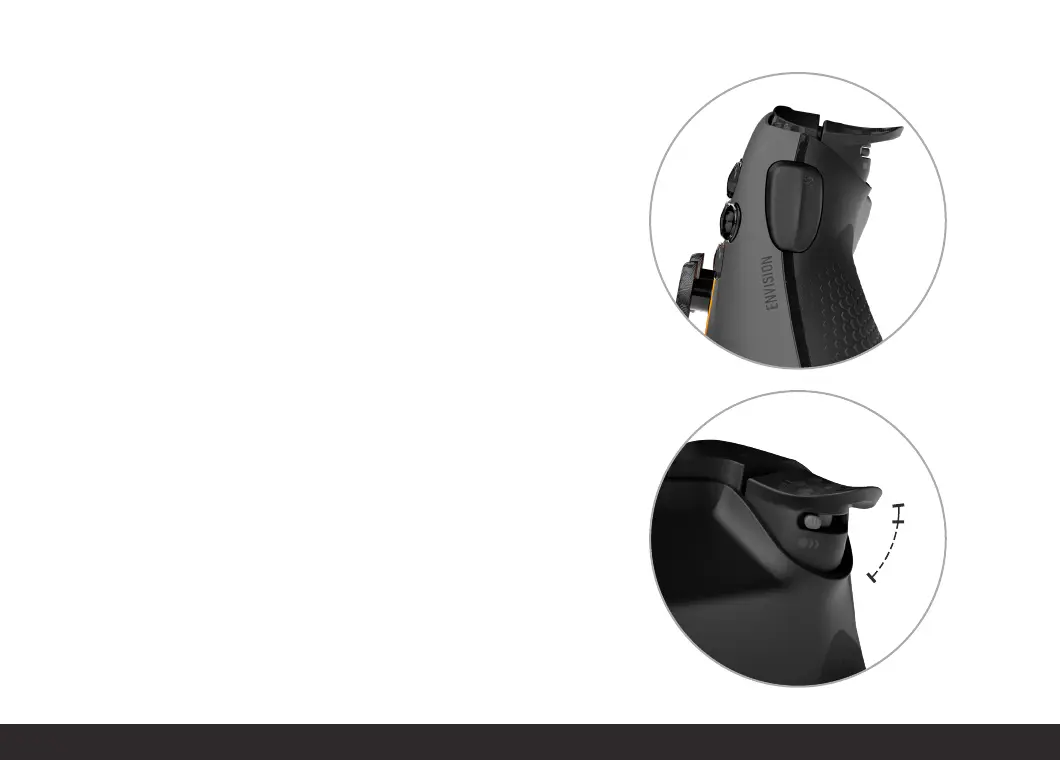
REMAPPABLE SIDE-ACTION BUTTONS (SAX):
Envision features two side-action buttons, one on each side of the
controller. Just in case you do not want to use the SAX buttons, we have
made them removable and have included blank out pieces to make sure
your controller still looks and feels great. To remove the SAX buttons,
simply remove the faceplate and replace the SAX buttons with the
included blank out pieces, then replace the faceplate. We think you’ll
love the extra buttons, though.
TRIGGERS:
Your Envision comes with standard triggers. Your Envision Pro, on the
other hand, comes with a two-way trigger stop, giving you your choice
of standard, partial trigger stops, or digital triggers. Use instant triggers
that activate like a mouse click for the fastest of shots. Prefer a longer
pull for those days at the track? No problem, flip the switch the other way
for the full range of motion in your triggers.
Pull and fire.


 To Next Page