SCUF Envision | 26 Quick Start Manual | English
USING SAVED PROFILES OR OUT OF THE BOX
CONTROLLER SETTINGS:
As a reminder, you can save your favorite profiles to one of the three
available on-board memory slots to your controller.
Additionally, almost all settings within each section (other than
lighting effects and non-standard controller functions) that you apply
to your profiles are saved with your profile to your controller.
To use your profiles that you saved to your controller, or if you just
wanted to use the out of the box controller settings and mappings,
you will need to quit iCUE completely.
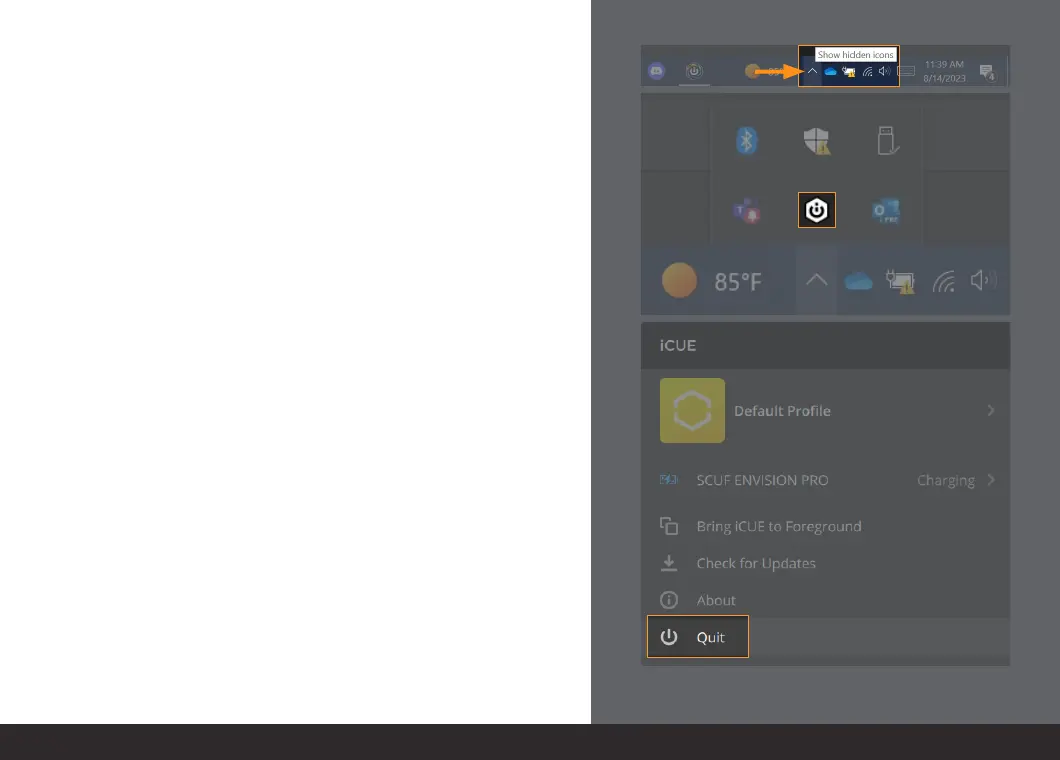
To quit iCUE, bring up your hidden icons. This is usually located near
the right side of your taskbar (bottom right of your entire screen).
Click the “^” (up arrow) and locate the iCUE icon.
Right click the iCUE icon and select “Quit.”
Now you have completely quit out of iCUE.
Please note that just closing the iCUE window, or closing it from
our taskbar, does not quit the program as it will still be running
in the background.
FOR MORE INFORMATION ON ADVANCED CONFIGURATION WITH ENVISION
AND ICUE, PLEASE VISIT SCUFGAMING.COM


 To Previous Page