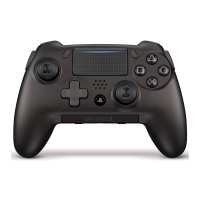
SCUF INFINITY
4PS
PRO
|
3
DIRECTIONS
Controller Set-Up
To set up your SCUF rst turn on your gaming console, then sync controller to
console. Start a game of your choice. Instructions may be found at:
scufgaming.com/instructions
SCUF Innity
4PS
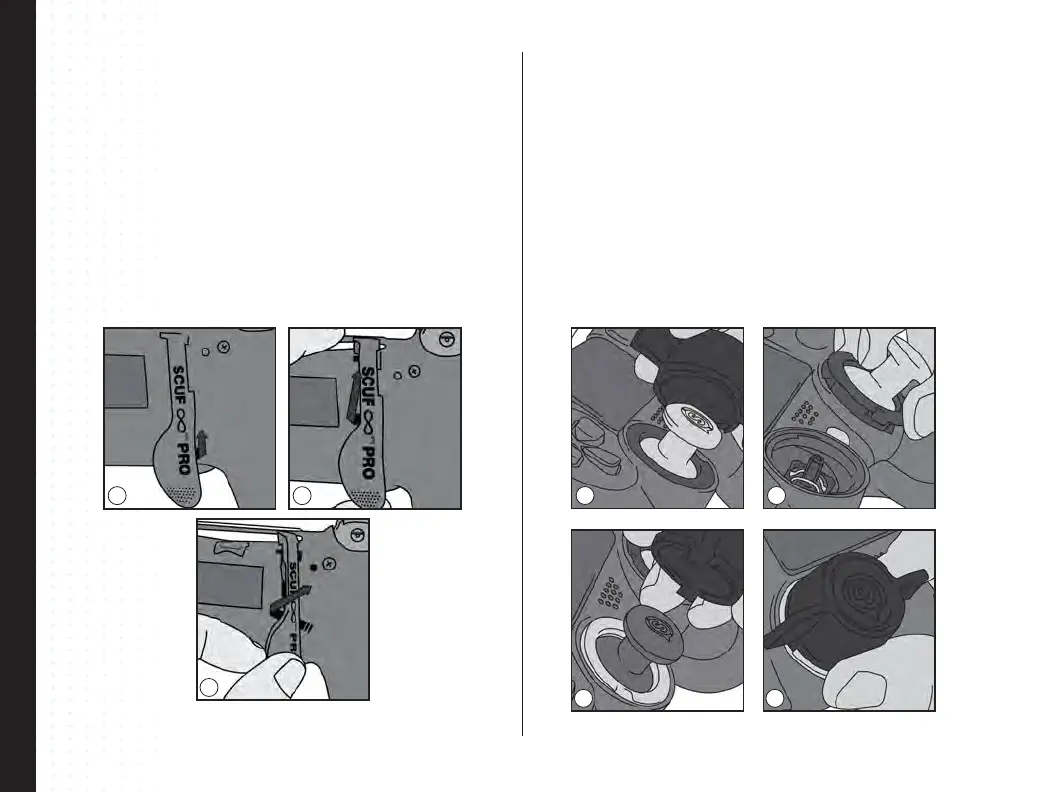
PRO Paddle Removal and Replacement
Step 1 Lift up slightly on the bottom of the paddle to be removed.
Step 2 Push the paddle upwards, and twist slightly out toward the closest handle to
remove the paddle.
Step 3 To replace a paddle, twist the paddle into the paddle cavity from the top. Then
slide to secure into place. You will hear a click when the paddle is secured in place.
1
3
2
1
3
2
4
Interchangeable Thumbstick Control Area
Step 1 Place the SCUF Lock over the Innity Ring and thumbstick on the controller.
The notches on the bottom of the SCUF Lock will insert into the grooves of the Innity
Ring.
Step 2 Turn the lock counter clockwise until movement stops. Pull straight up on the
thumbstick to remove both ring and thumbstick at the same time.
Step 3 Place a new thumbstick into your controller, make sure to line up the
thumbstick on the thumbstick shaft to ensure correct placement. The thumbstick will
lock into place on the controller.
Step 4 Use your SCUF Lock to secure the ring in place by turning the lock clockwise
until movement stops.



 To Next Page