Step 5 Install laser module and data cable
1
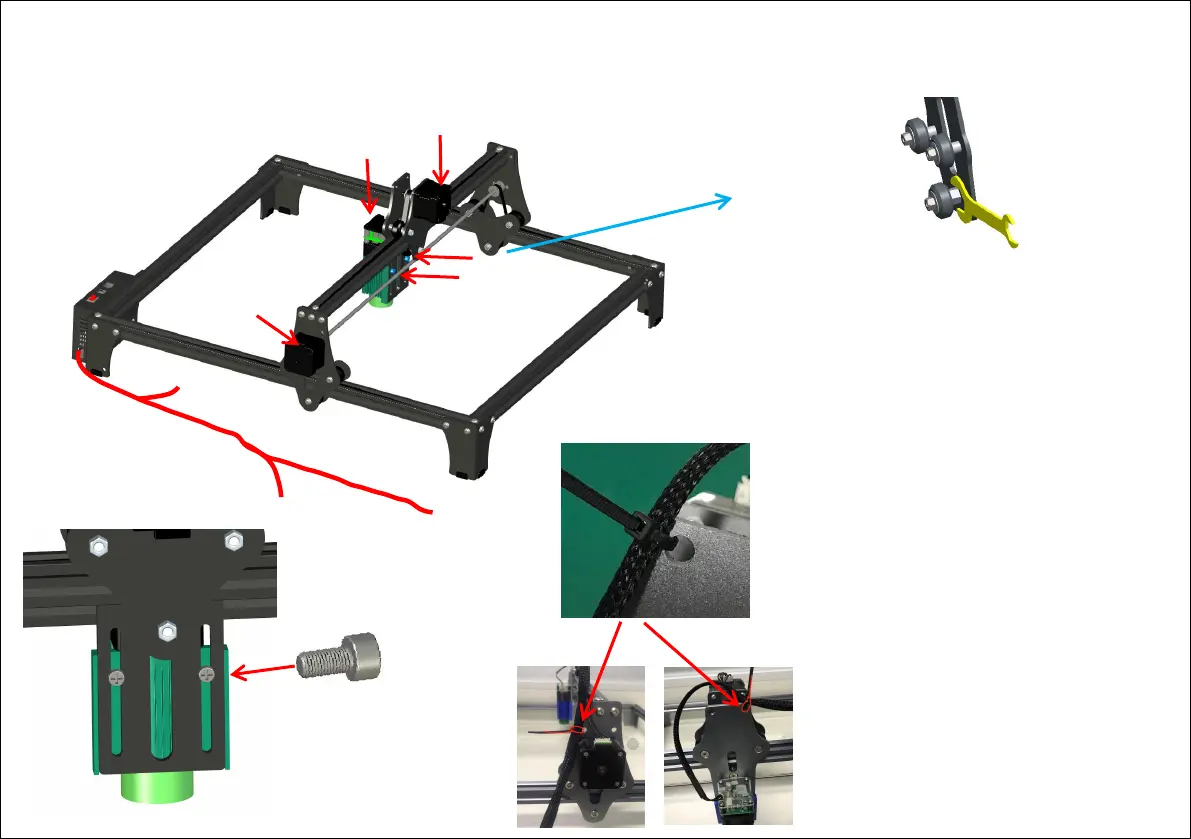
Tighten the screw
by hand to control
the tightness
X
Y
Laser
Laser
Y
X
1
If the tightness of the roller and the guide rail
is not suitable, use a wrench to turn it up and
down to control the tightness of the roller
and the guide rail
Question: How to judge the tightness of the belt?
Answer: After the installation is completed, tilt
the machine at 45°, if the X beam can slide
down slowly under the action of gravity, it is
appropriate.
2
Installation steps:
1. Install the laser module on the back panel
by hand-tightening the screws, and control
the tightening of the screws by hand
2. Connect the Y, X and laser terminals of
the data cable to the machine interface as
shown in the figure.
3. Use cable ties to fix the data cable on the
fixing hole to protect the data cable.
3
Data Cable



 To Next Page