SF-A9 Machine User Manual
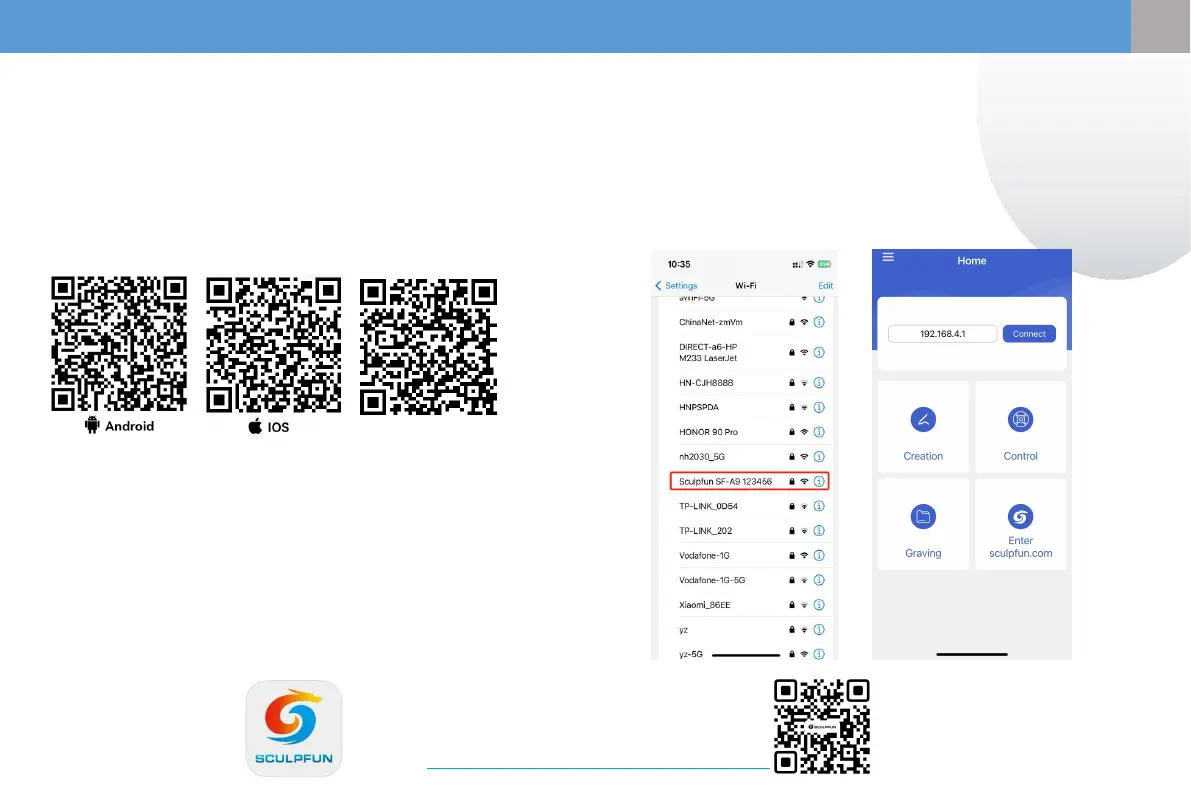
① Computer enters the official website to
download Sculpfun Laser Tool (MAC & WIN)
② Search sculpfun on Google Store or Apple Store
on your mobile phone, or scan the QR code
below.
① The factory default is AP mode. After turning on the machine, the machine
automatically transmits WIFI
② Pass Mobile phone connected to machine WIFI,The WIFI name is Sculpfun
SF-A9 XXXXX,The default password is:12345678
③ The default IP address is:192.168.4.1,Enter the default IP address in
SculpFun APP to connect to the APP
5、APP software download
Note:
1. Android needs to use a browser to scan the QR code
to download.
2. After successful installation, you need to give
corresponding permissions
3.If there is no Google Store, you can scan PC TOOL and
enter the official website to download the APK
installation version.
5.1 Mobile APP connection method 1 (AP WIFI)
Note: The software upgrade interface may change.
Scan the QR code or follow the official YOUTUBE
channel to get the latest detailed usage video
tutorials.https://www.youtube.com/@SCULPFUNReal
PC Tool
(MAC or WIN)
8
EN
EN


 To Next Page