SF-A9 Machine User Manual
Notice:
1. The machine only supports 2.4Ghz WiFi, please make
sure the WiFi at home is 2.4Ghz
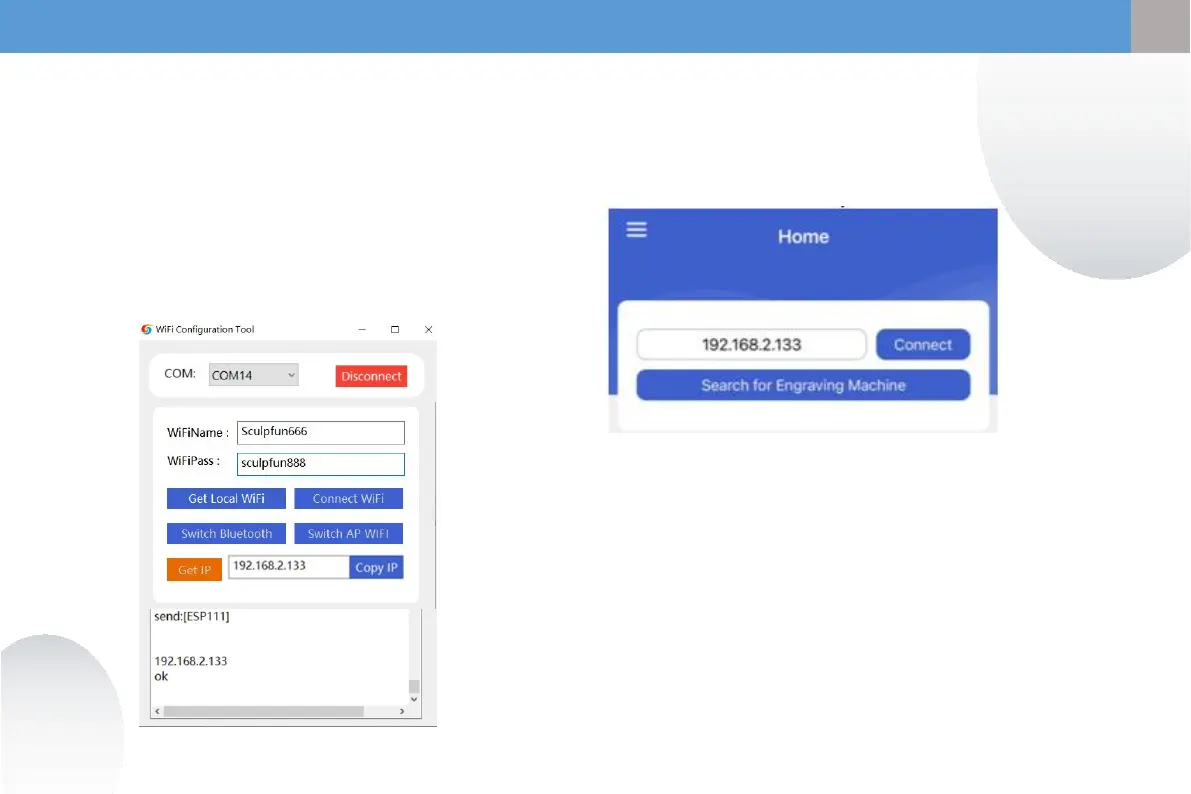
2. To obtain the machine IP address, please refer to the
software display. The above picture is for reference only.
3. Connect to the WiFi at home. The password does not
support special symbols. It only supports English or
numerical combinations. If it is too complicated, you
need to change the WiFi password.
4. The mobile phone needs to be on the same WiFi
network as the machine.
④
10
① Enter the WIFI name and password at
home
② Click Connect WiFi
③ Click Get IP to obtain the IP address of
the current machine. At this time, you
can unplug the data cable and transfer it
to the mobile APP for operation.
④ Enter the obtained IP address into the
mobile APP and click Connect.
③
②
①
①
②
③
EN
EN


 To Next Page