①
②
SF-A9 Machine User Manual
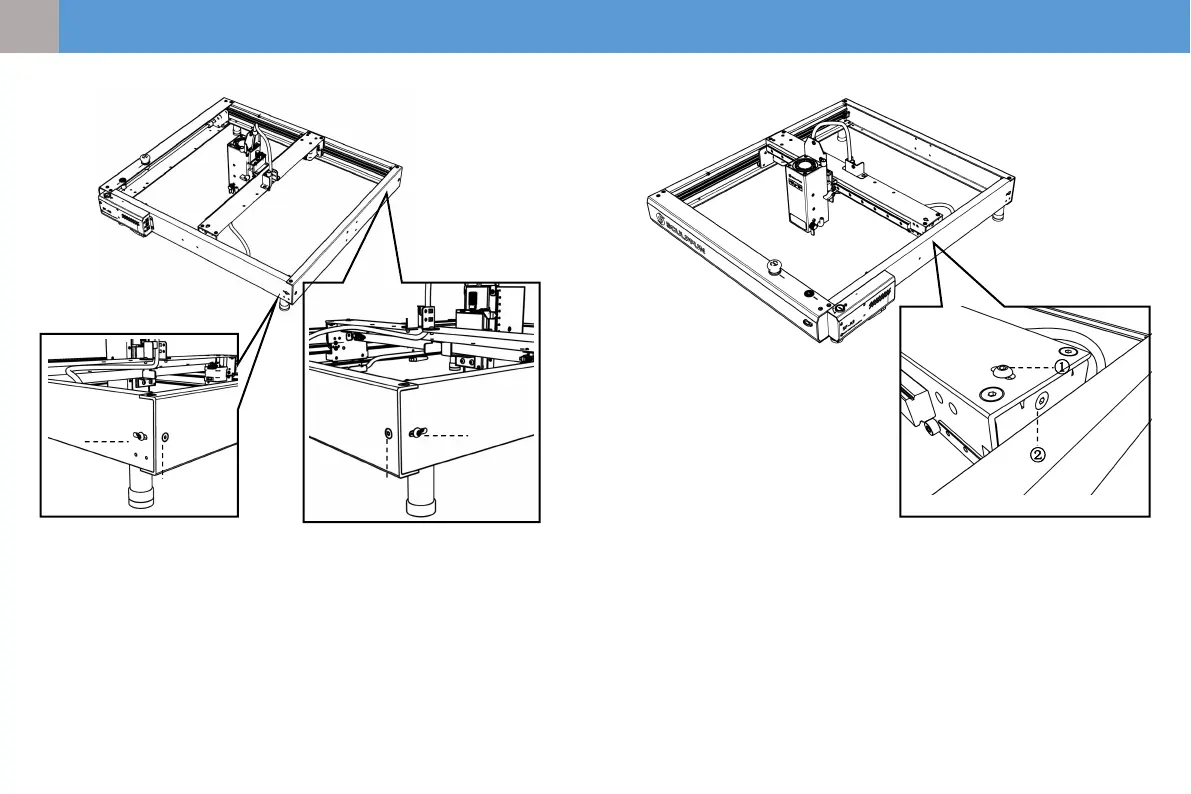
6、How to adjust belt tightness
Adjust the conveyor belts on the left and right
fenders
(1) Loosen screw 1 first, then adjust screw 2
(2) When adjusting screw 2, tighten it clockwise;
loosen it counterclockwise.
(3) The tightness of the conveyor belts on the
left and right baffles must be consistent,
otherwise it will affect the engraving effect.
(4) After adjusting the tightness, tighten screw 1.
①
②
①
②
Adjusting the conveyor belt on the center plate
(1) Loosen screw 1 first, then adjust screw 2
(2) When adjusting screw 2, tighten it clockwise;
loosen it counterclockwise.
(3) After adjusting the tightness, tighten screw 1
21
EN


 To Next Page