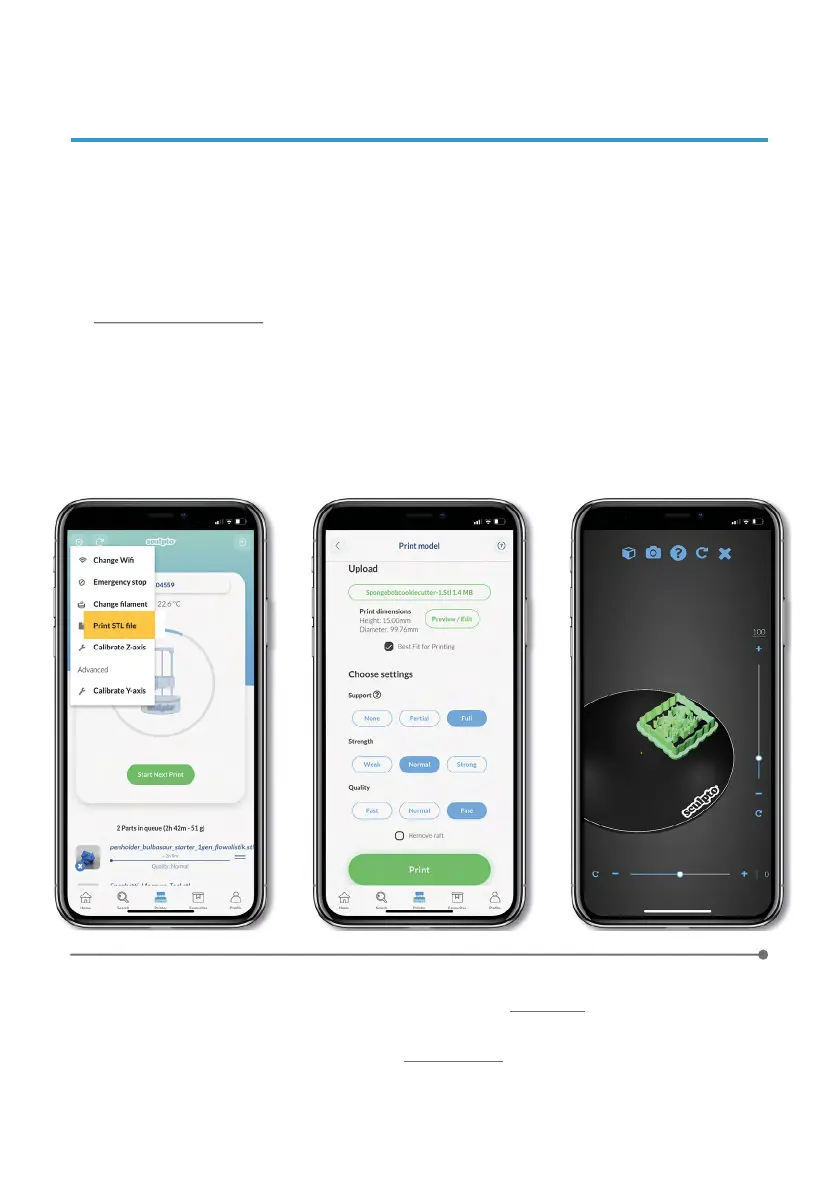
9. PRINT YOUR OWN PROJECT
Activate
expert mode
For a full video setup guide please
click here
11
Press the Tools icon in the upper left corner in the printer menu and press Print
STL file.
Upload your file to the app from Dropbox
or similar.
Only STL fi les can be 3D
printed on Sculpto 3D p rinter. Uploading STL fi les directly from the web app
www.app.sculpto.dk is extremely easy and STL files can be uploaded directly from
the desktop.
View/edit your design by pressing Preview/Edit. Read more about the settings
options and choose your preferred options.
1
2
3
4
When ready simply press print
and confirm your presence by typing in the color
code the Sculpto shows.


 To Next Page