
 Need help?
Do you have a question about the SCULPTO 2 and is the answer not in the manual?
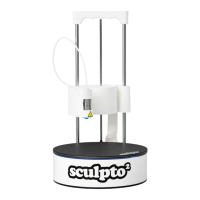
Introduces the Sculpto2 3D printer, highlighting its accessibility, capabilities, and target audience.
Details the main parts of the Sculpto2 3D printer, such as the handle, hotend, buildplate, and filament system.
Guide to obtaining the Sculpto application from app stores or accessing the web app.
Instructions for creating a new account or logging in to use the Sculpto app and printer.
Outlines conditions under which the Sculpto2 printer warranty will be invalidated.
Provides information on how to get help via FAQ, website, social media, and email.
Explains the meaning of different LED light colors and patterns on the Sculpto2 printer.
Defines key terms used in 3D printing and the Sculpto2 manual, such as Raft, STL, Strength, and Support.
 General
| Supported Materials | PLA, ABS, PETG, TPU |
|---|---|
| Connectivity | USB, SD Card |
| Filament Diameter | 1.75 mm |
| Nozzle Diameter | 0.4 mm |
| Frame Material | Aluminum |
| Print Bed | Heated Bed |

 To Next Page