EasyManua.ls Logo

SDI radii xpert - User Manual

SDI radii xpert
12 pages
Print Icon
To Next Page IconTo Next Page
Loading...
radii xpert
Professional LED Curing Light
Instructions For Use
Please read these instructions before operating this unit
Product description
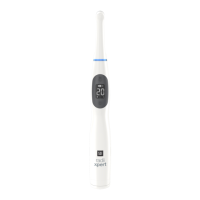
Thank you for purchasing the Radii Xpert LED curing light. The Radii Xpert is a high performance light source for the intraoral polymerization of
light-cured materials with photoiniator(s) in the wavelength range of 440 nm - 480 nm (standard curing tip). It has been designed to consistently
produce optimum polymerization for all light-cured materials in order to produce high-quality restorations.
Target assist technology, a special low power light, has been incorporated into the Radii Xpert to assist users to accurately position the curing tip
before polymerization begins.
The Radii Xpert is a high quality medical device which has been designed in accordance to the latest science and technology for curing lights.
Each unit comes with an international power supply and is suitable for power outlets from 100 - 240 Volts.
Your Smile. Our Vision.
www.sdi.com.au
Smarter design.
Optimal cure every time.

Questions and Answers

  • N
    nelsonspencerSep 23, 2025
    Why is the LCD flashing on my SDI radii xpert Dental equipment handpiece?
    • V
      Vincent CooperSep 23, 2025
      If the LCD on the handpiece of your SDI Dental equipment is flashing, it means the unit is in the setting mode. Press the button once to exit the setting mode.
  • V
    vobrienAug 23, 2025
    Why doesn't the dental material cure completely with my SDI radii xpert?
    • K
      Kenneth WilsonAug 23, 2025
      If the dental material does not cure completely when using your SDI Dental equipment, ensure that you are using the correct LED attachment. Also, check the material specifications from the manufacturer for specific curing requirements.
  • S
    Steven GoodmanAug 25, 2025
    Why does the dental material not cure completely with SDI Dental equipment?
    • B
      Brittney HebertAug 26, 2025
      If the dental material does not cure completely when using your SDI Dental equipment, ensure the correct LED attachment is used. Also, check the material specifications for curing requirements from the manufacturer.
  • K
    Katherine BrownAug 27, 2025
    What to do if the light emission doesn't start when pressing the button on SDI radii xpert Dental equipment?
    • R
      rwilliamsAug 27, 2025
      If the light emission does not start when the button is pressed on your SDI Dental equipment, the battery may be faulty. Return the handpiece to the charging dock for charging.
  • K
    kelsey77Aug 27, 2025
    What to do if my SDI radii xpert doesn't turn on after working fine yesterday?
    • D
      Daniel BradleyAug 27, 2025
      If your SDI Dental equipment does not turn on, it might be due to moisture from condensation. Check for any signs of moisture inside the barrier sleeve. If moisture is present, remove the barrier sleeve and allow the unit to dry for a few hours before attempting to use it again.
  • S
    suzannejonesSep 17, 2025
    Why is my SDI Dental equipment handpiece still red and hot after charging overnight?
    • D
      Daniel DickersonSep 17, 2025
      If the handpiece of your SDI Dental equipment has been on the charger overnight, the status ring is still showing red, and the handpiece feels very hot, it indicates a charging problem. The battery may be at the end of its useful life, and you should replace the battery.
  • B
    Brian JohnsonSep 14, 2025
    What does a solid red handpiece status ring mean on SDI radii xpert Dental equipment?
    • M
      Matthew ReidSep 14, 2025
      If the handpiece status ring on your SDI Dental equipment shows solid red, it means the battery is low. The handpiece can still be used for curing, but you should return it to the charging dock as soon as possible.
  • G
    Gregory MoraSep 15, 2025
    Why is there no audio beep when connecting with the handpiece of SDI Dental equipment?
    • K
      Karla RyanSep 16, 2025
      If you don't hear an audio beep when connecting with the handpiece of your SDI Dental equipment, it may be because the battery is empty. Return the handpiece to the charging dock for charging.
  • J
    John McguireSep 6, 2025
    What does it mean when the handpiece status ring flashes blue once and goes off on my SDI Dental equipment?
    • G
      George BartonSep 6, 2025
      If the handpiece status ring on your SDI Dental equipment flashes blue once and then goes OFF, it indicates that the battery is empty. Return the handpiece to the charging dock for charging.
  • H
    Harold PenningtonSep 3, 2025
    What to do if the light emission doesn't start when I press the button on my SDI radii xpert Dental equipment?
    • J
      Jennifer YangSep 3, 2025
      If the light emission does not start when you press the button on your SDI Dental equipment, it's likely that the battery is flat. Return the handpiece to the charging dock for charging.

Summary

Instructions For Use

Product Description

Summary of the Radii Xpert LED curing light's features and purpose.

Safety, Warnings & Cautions

Shock Hazard

Warning about electrical shock hazards associated with the device's operation.

High Intensity Light Hazard

Warning regarding the high intensity light emitted by the device and necessary precautions.

General Cautions

Important cautionary notes for safe operation and handling of the Radii Xpert.

Transport and Storage Conditions

Product Overview

Indications for Use

Specifies the intended use and compatible materials for the Radii Xpert curing light.

Technical Data

Detailed specifications and technical information for the Radii Xpert and its accessories.

Autoclave Warning

Crucial warning against autoclaving the LED light attachment or any device part.

Quick Start-Up Guide

Operating the Handpiece

Step-by-step instructions for operating the Radii Xpert handpiece and curing procedure.

Curing Time Guidelines

Recommendations for appropriate curing times for various dental materials.

Light Intensity Check

Procedure to verify the light intensity output using the built-in indicator.

Operation Procedures

Handpiece and Charging Operations

Details handpiece operation, charging status, and LED/lens cap changes.

Customizing Device Settings

Guide to setting favourite curing times and adjusting audio volume.

Troubleshooting Guide

Battery Replacement

Step-by-step instructions for replacing the battery in the Radii Xpert handpiece.

Maintenance and Cleaning

Device Cleaning Procedures

Detailed instructions for cleaning the handpiece and charging dock, including approved agents.

Storage and Disposal

Recommendations for storing the device during non-use and proper disposal methods.

Warranty Information

Warranty Claim Process

Procedures for making a warranty claim and registering the product.

SDI radii xpert Specifications

General IconGeneral
BrandSDI
Modelradii xpert
CategoryDental equipment
LanguageEnglish

Related product manuals