3.1 Windows 7 & Vista 64 bit and 32 bit Installation
This section shows installation procedure for Windows 7 (64 or 32 bits) – Vista procedure is similar.
Note: For Installation on Windows 10, Windows 8 or 8.1 refer to Chapter 3.3
Windows 7 and Vista users:
3.1.1 Download and save the VNWA Installation Package from the following location to your
desktop or to a download folder from:
http://www.sdr-kits.net/DG8SAQ/vnwaupdate.php?path=installer&source=Sdr-kits
Make sure the VNWA is NOT connected to the Computer
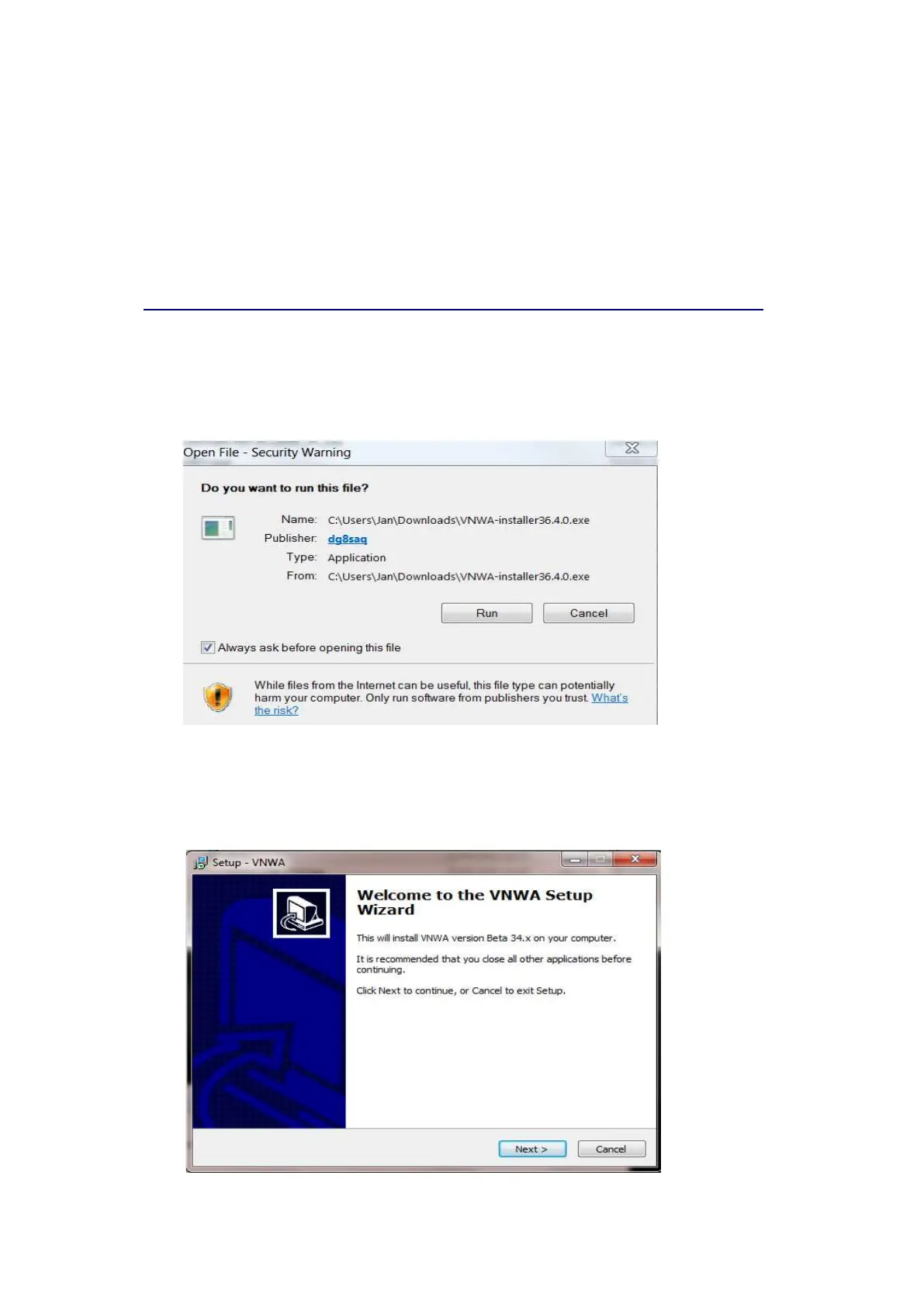
3.1.2 Double-click on the VNWA-installer Icon to start the VNWA installation process.
Open File – Security Warning will be displayed: Publisher: dg8saq type: Application
Confirm that you want to run this software by pressing “RUN”
3.1.3 Next User Account Control Window is now shown for dg8saq setup
Confirm the VNWA-installer can make changes to your Computer - Press “Yes”
then screen below is shown. Next Press "Next >"
SDR-Kits
®
VNWA 3 - 3E "Getting Started" Manual v1.05c - copyright 2015 - 2018 by SDR-Kits
®
Page 3 of 52


 To Next Page