How to check the power of the battery?
Press the battery status button to see the current remaining battery power by the color
of the battery status indicator: Green: 100%-80%, yellow: 80%-20%, red: less than 20%.
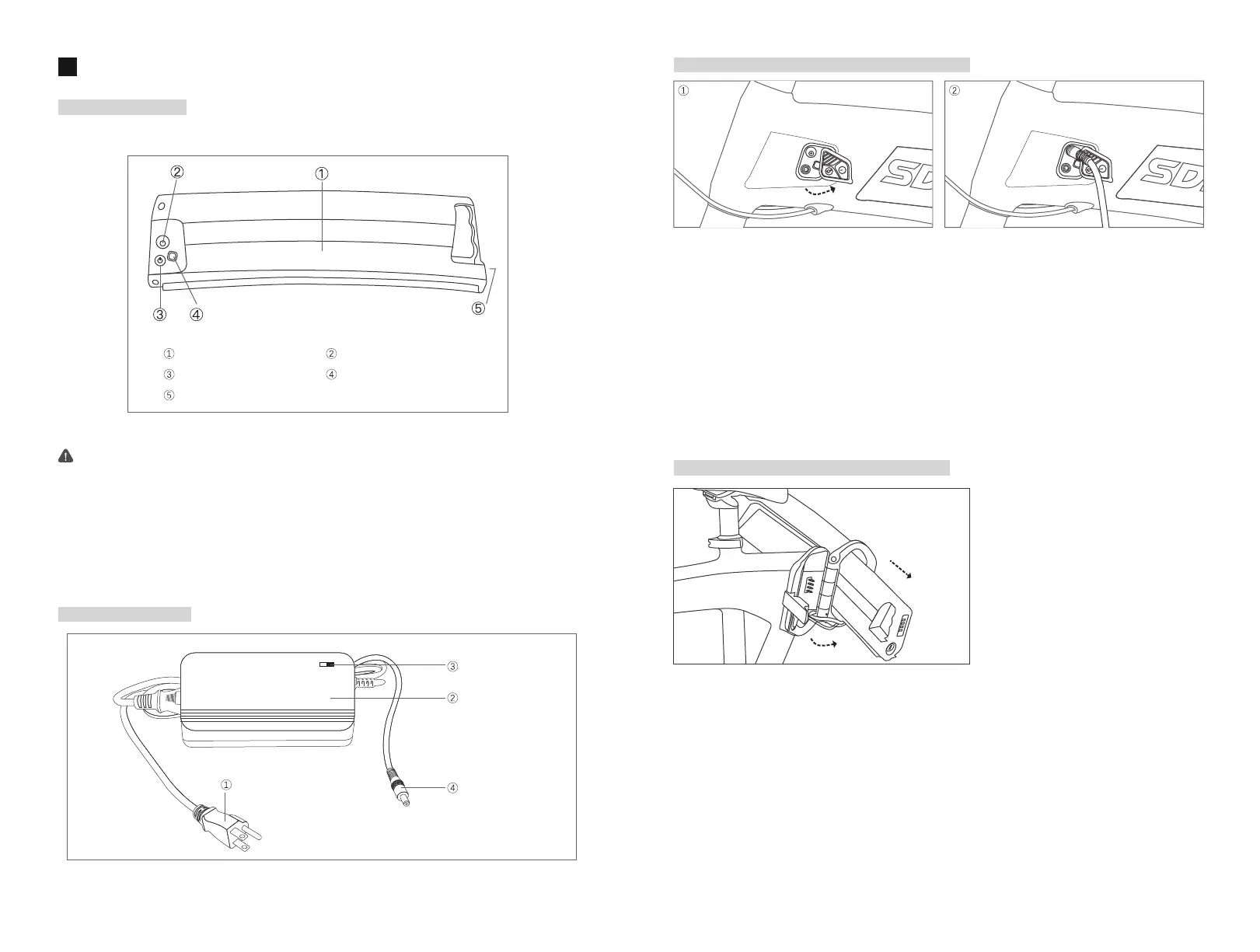
1. Fold the middle part of the bike, use the battery lock key to release the fixing device
between the battery and the body, and carefully pull out the lithium battery.
2. Connect the power plug of charger to the socket with specified voltage.
3. Insert the charging plug of the charger into the charging jack of the battery, and then
start charging. At this time, the charger indicator is displaying in “Red” .
4. When the charger indicator turns to “Green”, the battery is fully charged.
1. Open the dust cover on the left side of the e-bike.
2. Plug in the charging plug into the battery's charging jack.
3. Connect the charger power plug to the socket of the specified voltage.
4. Start charging, the charger indicator is displaying in “Red”.
5. When the charger’s indicator turns to “Green”, it means that the battery has been fully
charged. It takes about 3-8 hours to fully charge the battery.
Attention:
65
BatteryAnd Charger
Battery Appearance
Charger Appearance
Charging Without Disassembling Of The Battery
Charging With Disassembling Of The Battery
Power Plug
Charger Shell
Indicator
Charging Plug
Battery Case Charging Jack
Battery Status Button Battery Status Indicator
Battery Keyhole



 To Next Page