Revision 2012.02.27
32
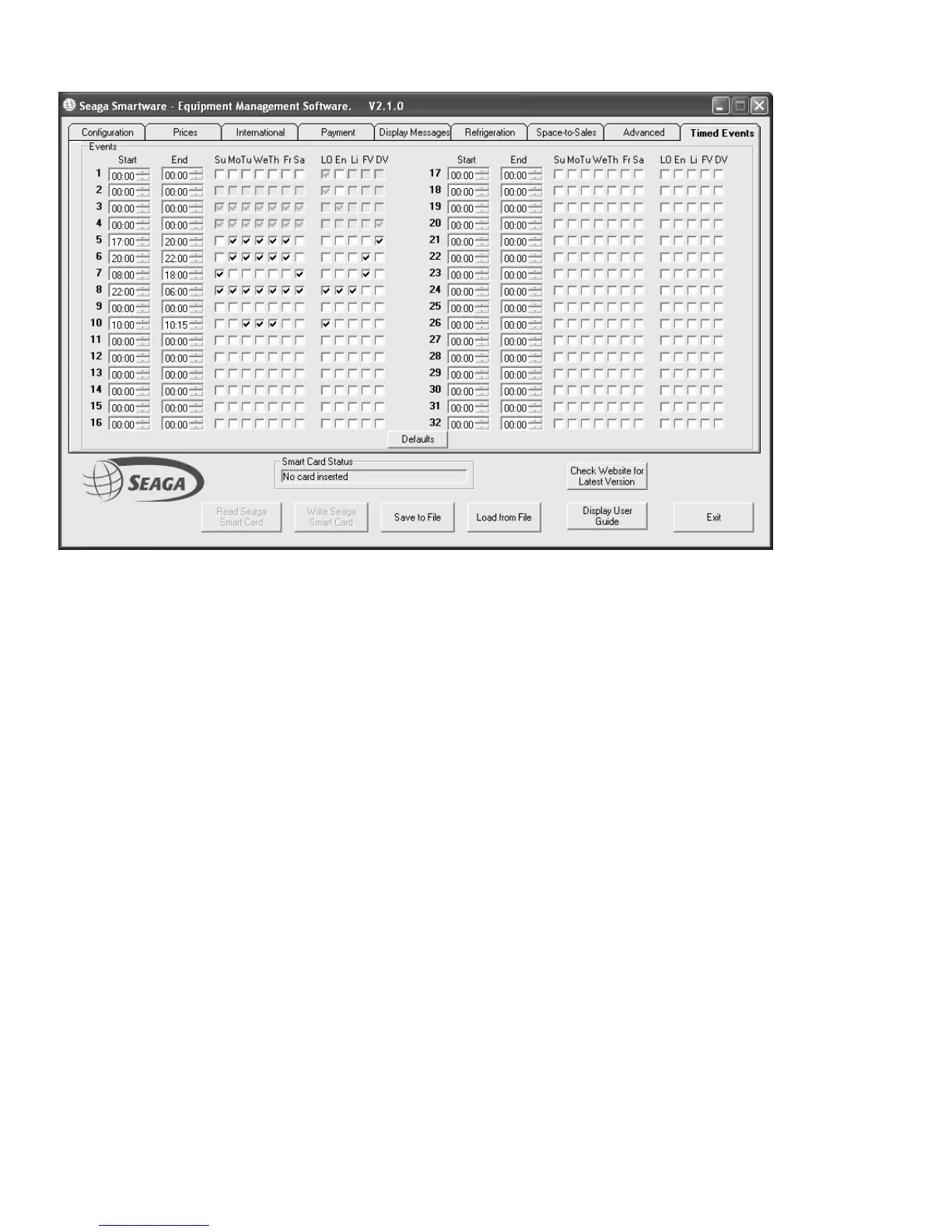
TIMED EVENTS PAGE
Version 1.10 and later Premier VMC software supports up to 32 separate timed events. Each event can be set to occur
between the START and END times for the selected days of the week. Event times may overlap.
Each Event can then have the following actions (more than one selection may be applied)
LO Timed Lockout
En Refrrigeration Energy Saving
Li Lights OFF
FV Free Vend
DV Discounted Vend (If both DV and FV are selected, free vend will apply)
Use the Defaults button to clear the events back to the factory default configuration
Events 1 – 4 are backwards compatible with earlier versions of VMC software.
Events 1 and 2 Timed Lockouts with shared Days of the Week active.
Event 3 Energy Saving only
Event 4 Discounted Vend only
In the screenshot above the following events are set for an example “factory/office” application:
Discounted prices for anyone working late 17:00 to 20:00 on weekdays
Free vend for anyone working after 20:00 on weekdays and between 08:00 and 18:00 at weekends.
Energy saving every night from 22:00 until 06:00 the next morning.
Timed Lockout between 10:00 and 10:15 on Tuesdays, Wednesdays and Thursdays for a “staff meeting”
!










 To Next Page