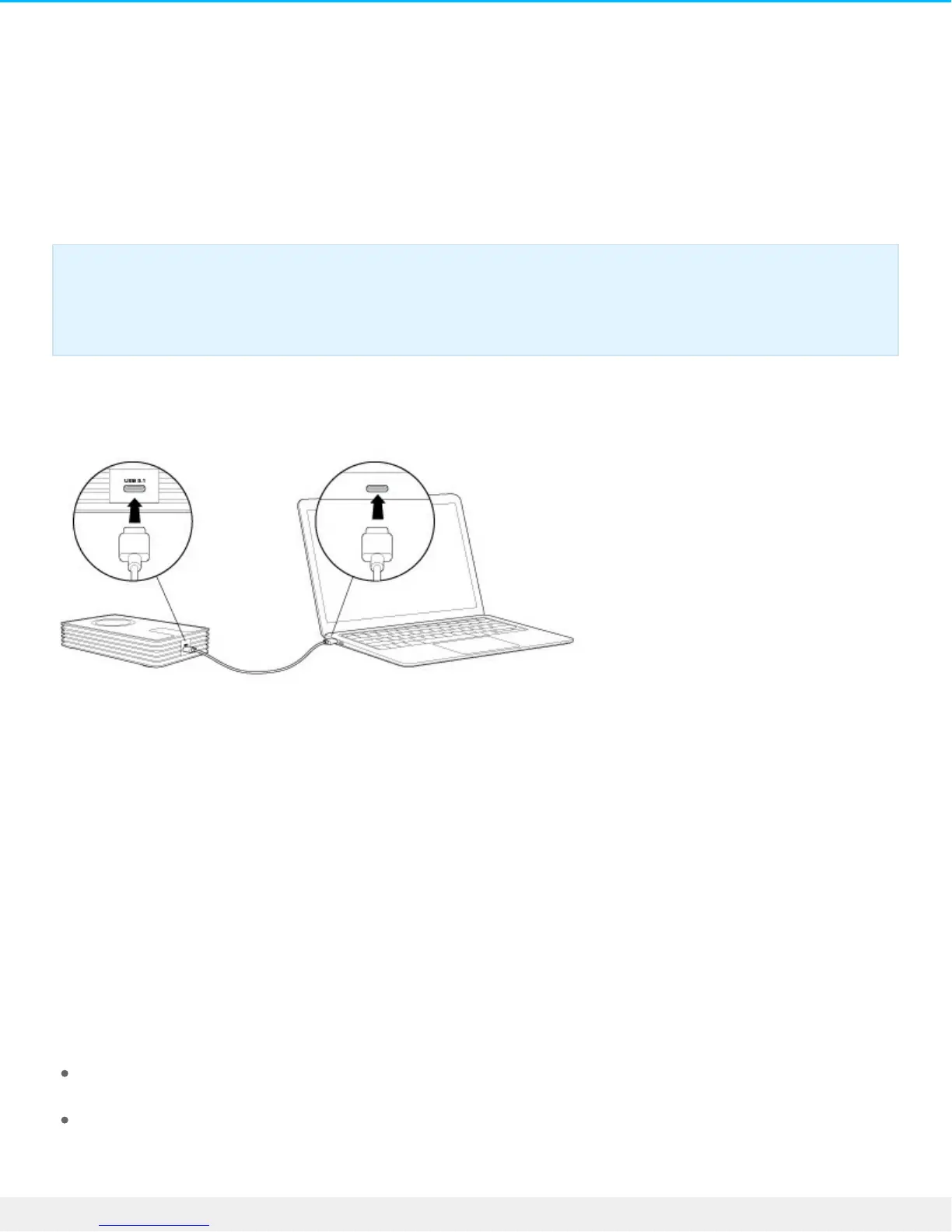
Connect your Innov8 to your computer
Your Innov8 is compatible with computers that feature a USB-C port.
Step 1 – Connect to your computer
Attach one end of the included USB-C cable to the Innov8 and the other end to a USB-C port on your
computer. The LED may turn red before changing to white.
Your Innov8 is approximately 75% charged out of the box. The battery charges automatically when it is
connected to your computer.
Step 2 – Registraon and soware
Register your Seagate Innov8 to assure quality Seagate support and receive the latest news regarding your
device. You can register your device and install Seagate software in a few simple steps.
Software included with your Innov8:
Lyve–Automatically collect photos and videos stored on all your devices and display them in one
organized view. For details, visit Lyve.
Dashboard–Backup software for your Windows computers, mobile devices and social media. For
details, see Dashboard.
Important info regarding USB-C cables: Third-party USB-C cables can be faulty or defective due
to improper materials and/or construction. Only use the USB-C cable included with your Innov8.
Using third-party USB-C cables or, USB-C to USB Type A cables of any kind voids your warranty.







 To Next Page