Introducon
Recommendaons
Intended for desktop PCs.
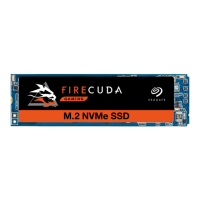
Seagate M.2 NVMe SSDs come in the single-sided or double-sided M.2 2280 form factor with the
following maximum dimensions: 80.85mm (L) x 24.15mm (W) x 3.58mm (H). Verify that your system
provides enough space for installation.
For optimal performance, provide sufficient airflow and cooling. Use a motherboard-integrated
heatsink and cooling system.
Before installaon
Most motherboards have more than one M.2 slot available for SSD drives. Before installing M.2
NVMe SSD:
Determine the appropriate M.2 slot on your motherboard. If another SSD drive is already
installed in the slot, you'll need to remove it during the installation.
Decide whether you want to install your computer operating system on M.2 SSD and use it as your
primary drive. See your computer or motherboard documentation for details on how to boot from
M.2 SSD.
If you need to transfer files from another drive to M.2 SSD, consider how you will move your data
or clone your drive before starting the installation.
Precauons
Unpack the SSD.
Inspect the SSD for any damages.
For the safety of your SSD, take precautions to avoid electrostatic discharge. Power down and power
drain your computer according to the instructions provided in the computer product documentation.
Back up the data from the existing storage device.
Parts
Seagate M.2 NVMe SSD
System Requirements
M.2 (M key) slot with compatible PCIe® interface. To ensure your system can utilize the full potential
® ®
IMPORTANT Make certain your computer's BIOS is up to date before installing M.2 SSD. See
your computer or motherboard documentation for information on how to access the BIOS.




 To Next Page