
 Need help?
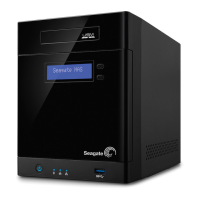
Do you have a question about the Seagate NAS Pro 4-Bay and is the answer not in the manual?
States compliance with FCC radiation exposure limits.
Instructions for safely handling the NAS Pro and its components.
Instructions for setting up a NAS Pro with pre-installed hard drives.
Procedure for powering on the NAS Pro.
Steps for the initial login and setup process.
Instructions for setting up a diskless NAS Pro enclosure.
Connecting cables for a diskless NAS setup.
Procedure for powering on a diskless NAS Pro.
Instructions for inserting hard drives into the enclosure.
Steps for the initial login after inserting drives.
Detailed steps to power on the Seagate NAS Pro.
Procedures for safely powering off the NAS Pro.
Safety precautions before performing hard drive maintenance.
Step-by-step instructions for adding or replacing hard drives.
Procedure for installing/replacing 3.5-inch hard drives.
Procedure for installing/replacing 2.5-inch hard drives or SSDs.
Common issues and their solutions for the NAS Pro.
Troubleshooting steps when the NAS Pro fails to power on.
Resolving issues where the NAS turns off upon USB connection.
Step-by-step guide to performing the NAS OS rescue.
 General
| Model | Seagate NAS Pro 4-Bay |
|---|---|
| Category | Network Storage Server |
| Bays | 4 |
| RAM | 2GB DDR3 |
| Network Interface | 2 x Gigabit Ethernet |
| USB Ports | 2 x USB 3.0 |
| Operating System | Seagate NAS OS |
| Supported RAID Levels | RAID 0, 1, 5, 10 |
| Drive Interface | SATA III |
| Processor | Intel Atom Dual Core 1.7GHz |








 To Next Page