2. Setting Up GoFlex Home – Windows Step 2: Connecting GoFlex Home
FreeAgent® GoFlex™ Home User Guide (Version 2) 12
Step 2: Connecting GoFlex Home
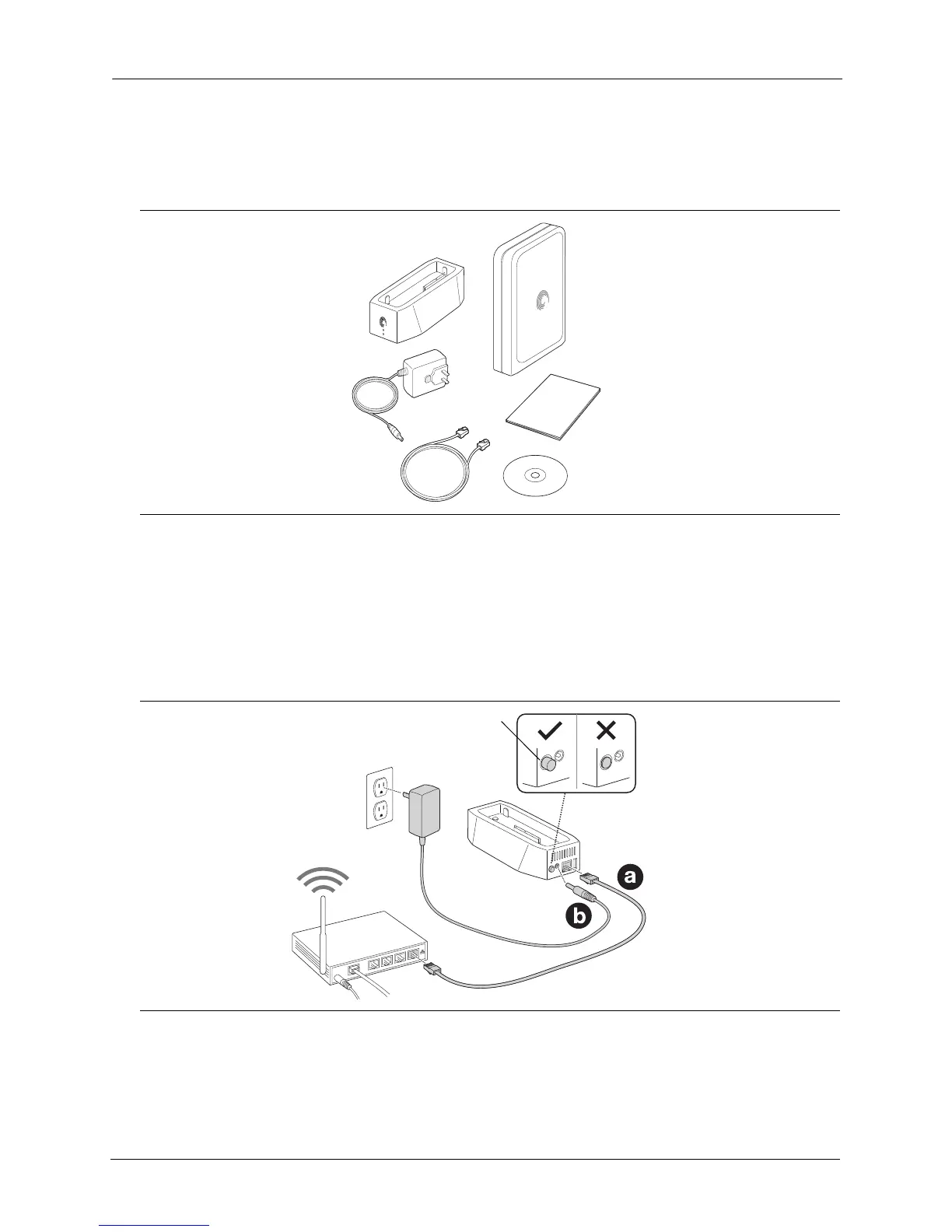
1. Unpack the box and ensure you have these items before continuing:
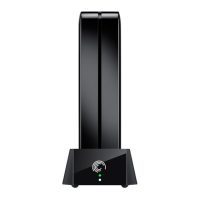
2. Ensure the Power button on the GoFlex Home dock is in the Off position before you begin,
then connect GoFlex Home:
a. Connect the supplied Ethernet cable to your router and to the Ethernet port on GoFlex Home.
b. Connect the supplied power adapter (DC 12V) to a power outlet and to the power port on
GoFlex Home.
Figure 3: Package Contents
Figure 4: Connecting the Cables
Ethernet Cable
GoFlex Drive
Power Adapter
Quick Start Guide
Installation CD
GoFlex Home Dock
Power Button in Off Position



 To Next Page