INSTALLATION
MANUAL
Section 2: ELECTRICAL INSTALLATION
2.5 SEAKEEPER 1 DISPLAY CONNECTION
Reference Drawings:
•
90511 – Seakeeper 1 Cable Block Diagram
•
TB 90573 – Seakeeper 1 Display Options
o
TB 90478 – Garmin and Seakeeper Compatibility
o
TB 90479 – Raymarine and Seakeeper Compatibility
o
TB 90480 – Simrad and Seakeeper Compatibility
o
90600 – Seakeeper 1, 5” Touch Display
2.5.1 SEAKEEPER 1 DISPLAY OPTIONS
The Seakeeper 1 has two options for establishing a Seakeeper display interface to support the
Seakeeper App, as outline in TB 90573:
1. Connect the Seakeeper 1 to a compatible Multifunction Display (MFD).
2. Install an optional Seakeeper 5” Touch Display.
A Sea
keeper display is required with the installation of a Seakeeper 1 to support the full functionality
of the unit through the Seakeeper App in addition to the ConnectBox. The Seakeeper App provides an
interface for controlling the Seakeeper 1 or viewing the Settings, Service, Info, and Alarm pages. The
Seakeeper ConnectBox can be helm-mounted to provide an additional interface for the control of the
Seakeeper 1 but does not replace the need for a Seakeeper compatible display.
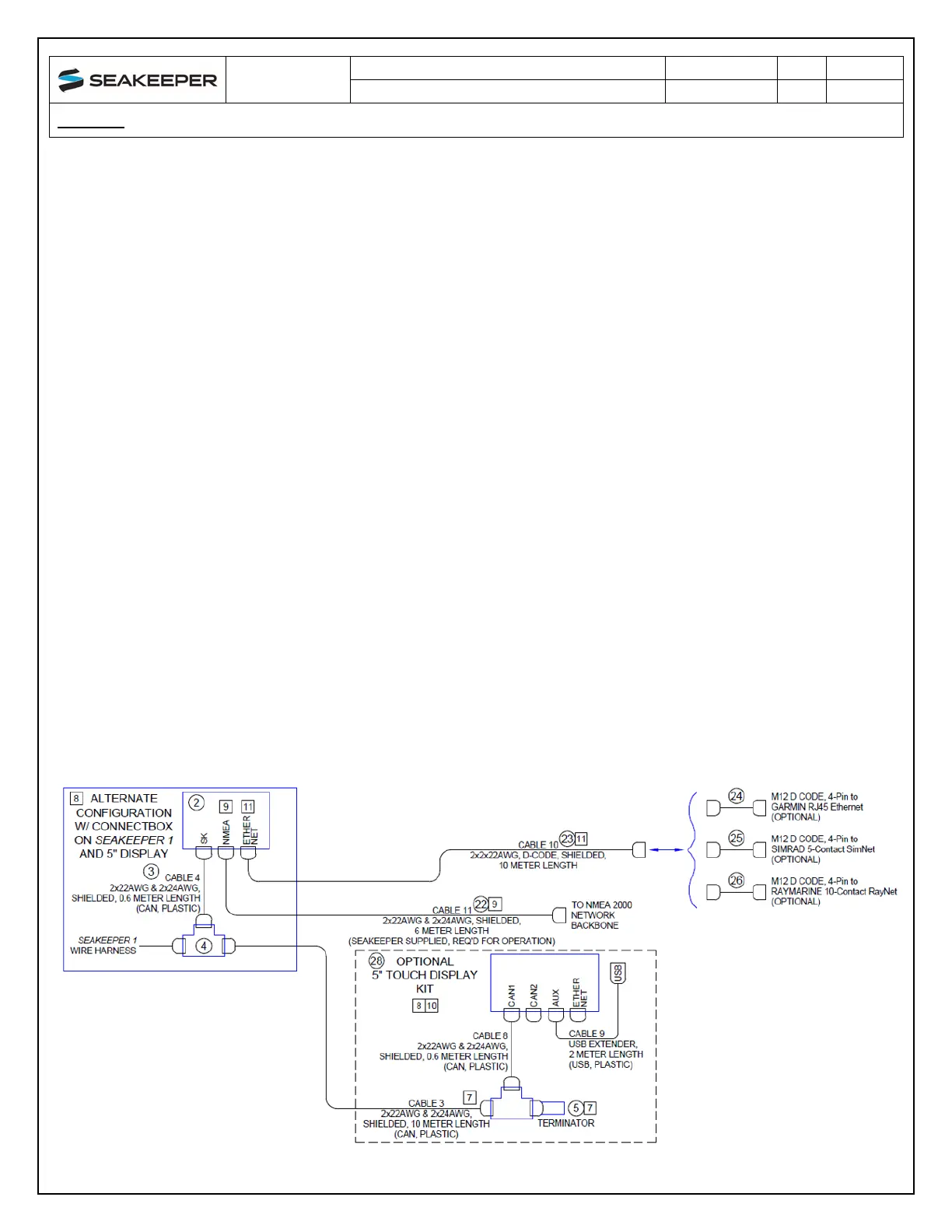
The following Figure provides a schematic of the two display options. The subsequent sections outline
the instructions and references for connecting the Seakeeper 1 to each of these display options.
Figure 18: Seakeeper 1 Display Options (Drawing No. 90511)



 To Next Page