OPERATION
MANUAL
13 of 22
Section 2: SYSTEM OPERATION
If it is necessary to stop Seakeeper motion for any reason press the
STABILIZE button. The STABILIZE button will turn grey indicating that
the Seakeeper is locked. Never attempt to work on the Seakeeper until
the flywheel has stopped spinning. If the brake system has
automatically locked the Seakeeper due to an alarm or failure, no
attempt should be made to bypass the alarm or automatic lock.
2.2.3 NORMAL SHUT-DOWN
The Seakeeper should be shut-down when stabilization is no longer required. This maximizes the
longevity of the Seakeeper 1.
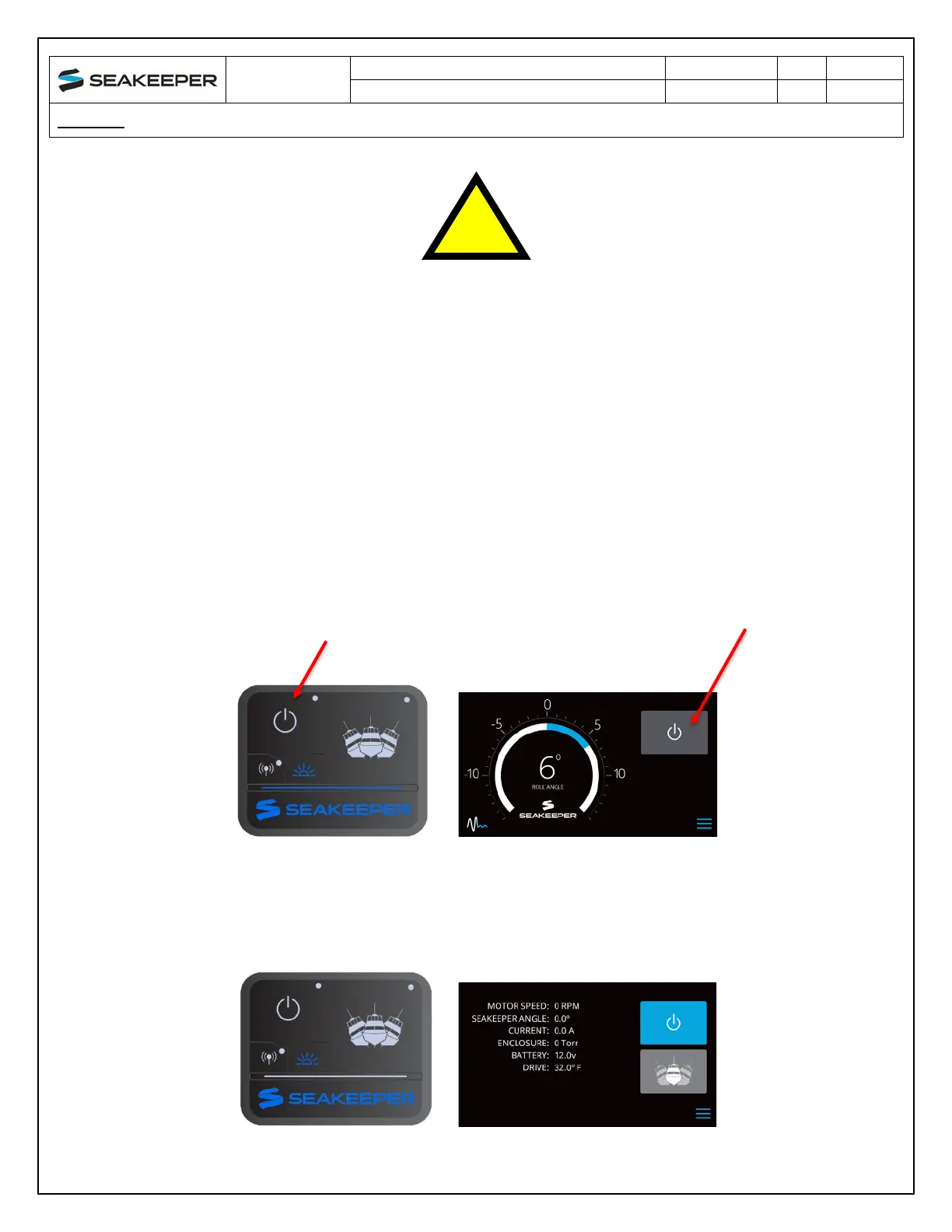
1) Press the Seakeeper POWER button. The POWER button will turn grey. The Seakeeper will
discontinue stabilization and the flywheel will start coasting.
2) Once the vessel is secured in the slip, switch the high current (80A circuit breaker) and low
current (circuit breaker rated per seawater pump) DC power to the Seakeeper off. The flywheel
will continue to spool down to 0 RPM. This can take 2+ hours from full speed. When th
e
fl
ywheel has stopped spinning, 0 RPM will appear on the service screen.



 To Next Page