OPERATION
MANUAL
7 of 22
Section 2: SYSTEM OPERATION
2.1.2 SETTINGS PAGE
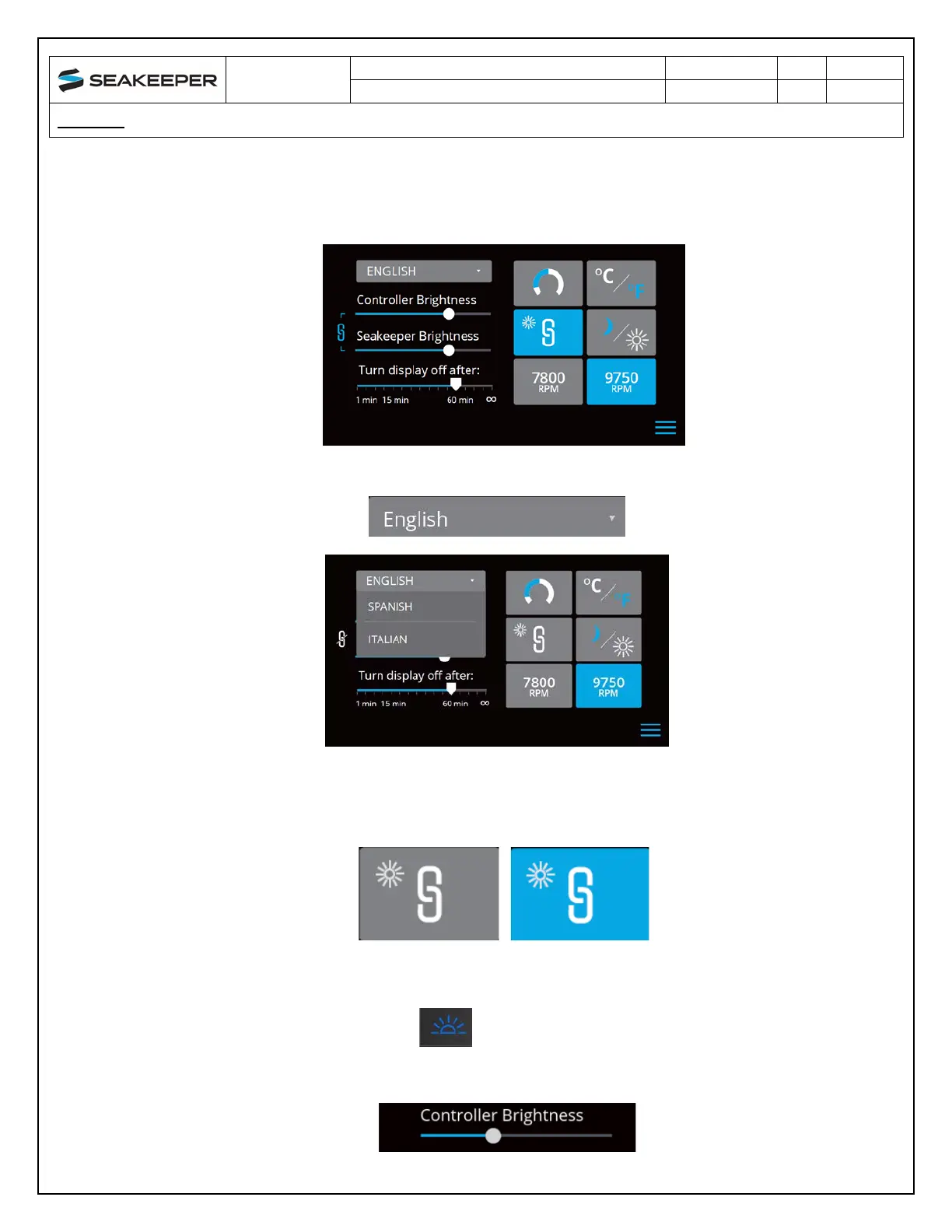
8. The Settings Page allows the user to adjust their preferences for the Seakeeper and its display.
It can be accessed by pressing the gears in the menu bar.
9. Th
e language on the Seakeeper Application can be changed using the Settings Page. By clicking
ENGLISH, a dropdown appears, and the desired language can be selected.
10. T
he brightness of the Seakeeper LED lights, ConnectBox, and display can be changed
individually or synchronized to the local controller (either the Seakeeper 5” Touch Display or
the ConnectBox) brightness by pressing the SYNCHRONIZE BRIGHTNESS Button from gre
y
(SYNC BRIGHTNESS Off) to blue (SYNC BRIGHTNESS On).
11. Wh
en the SYNC BRIGHTNESS Button is Off, the local controller, ConnectBox, and Seakeeper
brightness can be controlled individually. The ConnectBox brightness can be controlled by
pressing the BRIGHTNESS button on the ConnectBox. To increase or decrease the
brightness of the Seakeeper 5” Touch Display, slide the white dot left to decrease brightness
and right to increase brightness on the brightness bar, pictured below on the Settings Page.



 To Next Page