Section 2: SYSTEM OPERATION
iv. HOME SCREEN VIEW
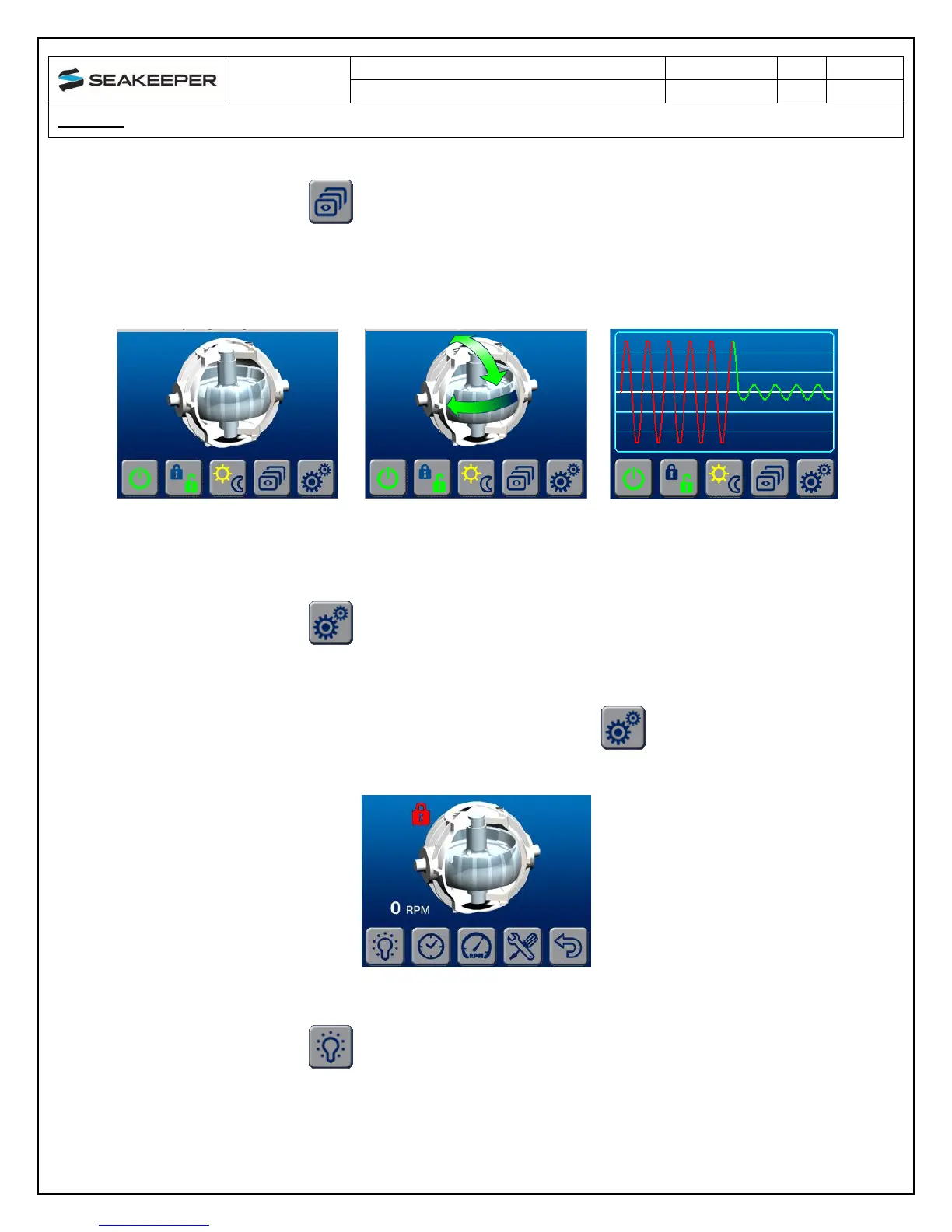
1. Switches the HOME screen views from an animation screen,
to a screen displaying arrows with no animation, to a screen
that shows roll rate on a graph
Home Screen with Animation:
Flywheel will be spinning and
Seakeeper stabilizing
Home Screen with Arrows for
flywheel spinning and
stabilizing
Home Screen indicating Roll
Rate
v. SETTINGS SCREEN
1. Changes from the HOME screen to the SETTINGS screen
4) When the button is depressed for the SETTINGS screen the DISPLAY changes to
the SETTINGS screen
a. SETTINGS screen BUTTON ICON functions
i. Allows the brightness of the DISPLAY to be increased or
decreased. The brightness settings for the DAY or NIGHT modes can
be independently adjusted by selecting the DAY or NIGHT on the
main page before entering the SETTINGS screen.


 To Next Page