If the icon is not visible at the taskbar
\RXFDQÛQGLWE\SUHVVLQJWKHeRSHQDUHDDUURZq
where all the applications are displayed.
please refer to the screenshot on the right.
!
4 Activating the Seal One
®
at an acceptance partner
To use the Seal One
®
USB with our acceptance partner, you must enab-
le the device within the application of acceptance partners in advance.
Since the activation process at the acceptance
partners may differ, please follow the instructions
of the acceptance partners. For questions and
comments, please contact the hotline of the
acceptance partner.
Registered Seal One
®
DFFHSWDQFHSDUWQHUVDUHLGHQWLÛHGE\WKHDFFHS-
tance logo shown above: The logo indicates that the partner application
is able to work with Seal One
®
.
5 Rotate display
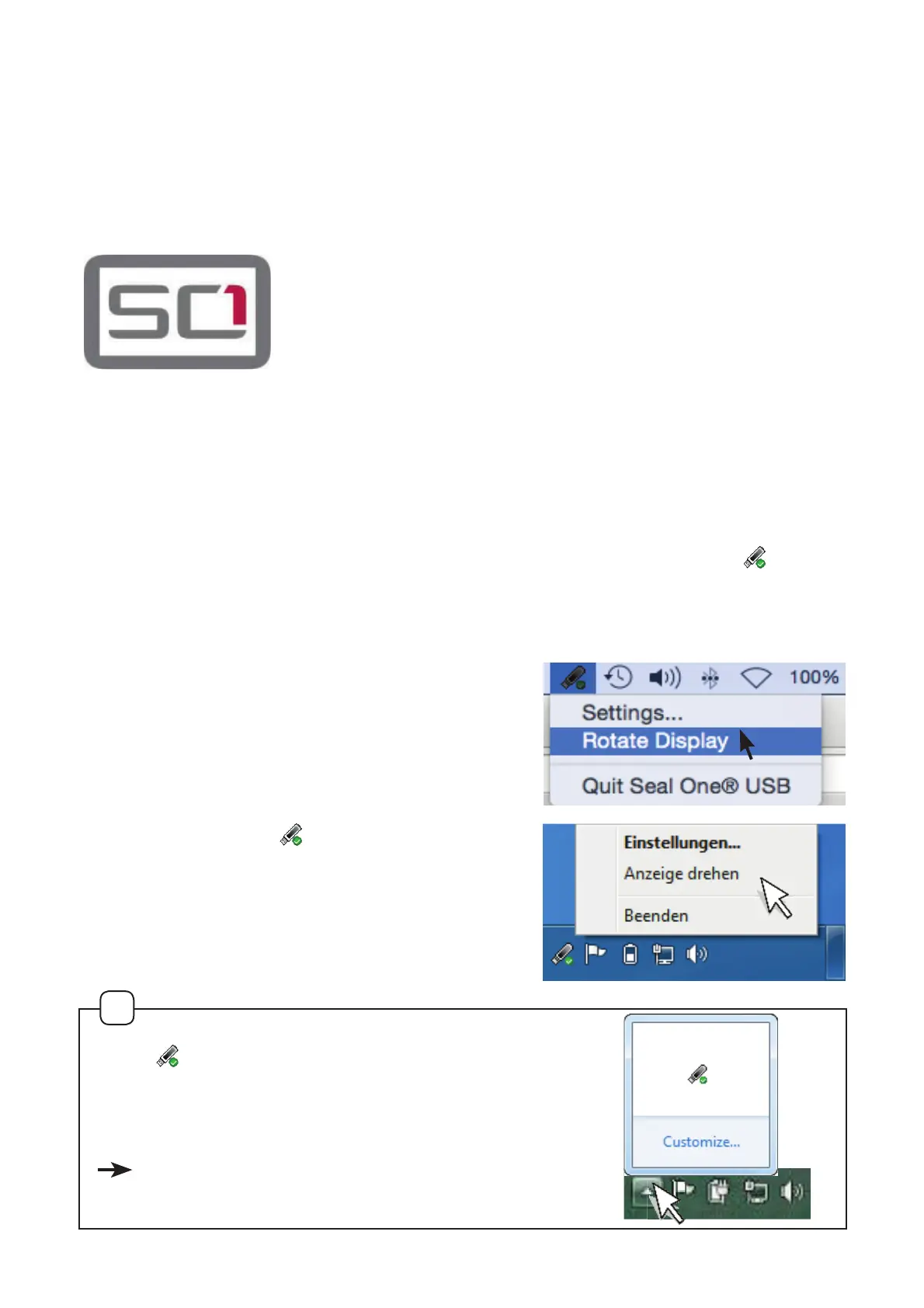
When the Seal One® USB is connected to the laptop / PC, an icon
DSSHDUVLQWKHWDVNEDUQRWLÛFDWLRQDUHDVHHÛJXUH
In some cases it may occur that the
displayed text of the Seal One
®
USB is
shown upside down.
You can rotate the display if you
„right-click“ on the
icon in the
taskbar, and select „Rotate display“.


 To Next Page