OPERATION
Before you begin programming your thermostat, you should be
familiar with its features and with the display and the location
and operation of the thermostat buttons. Your thermostat con-
sists of two parts: the thermostat cover and the base. To
remove the cover, pull it straight out from the base. To replace
the cover, line up the cover with the base and press until the
cover snaps onto the base.
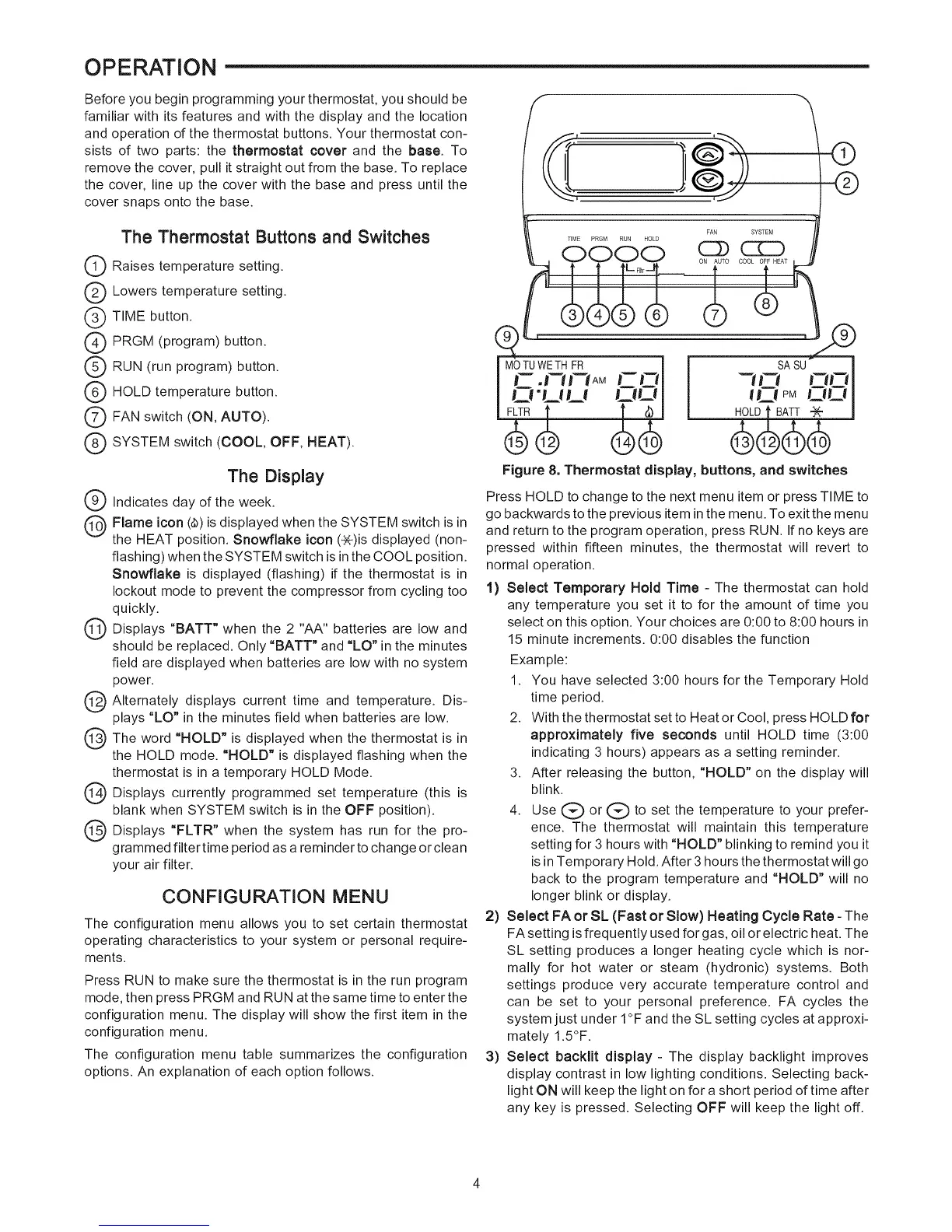
The Thermostat Buttons and Switches
Q Raises temperature setting.
Q Lowers temperature setting.
Q TIME button.
Q PRGM (program) button.
Q RUN (run program) button.
Q HOLD temperature button.
Q FAN switch (ON, AUTO).
Q SYSTEM switch (COOL, OFF, HEAT).
The Display
Q Indicates day of the week.
Q Flame icon (_) is displayed when the SYSTEM switch is in
the HEAT position. Snowflake icon (_)is displayed (non-
flashing) when the SYSTEM switch isin the COOL position.
Snowflake is displayed (flashing) if the thermostat is in
lockout mode to prevent the compressor from cycling too
quickly.
Q Displays "BATT" when the 2 "AA" batteries low and
are
should be replaced. Only "BATT" and "LO" in the minutes
field are displayed when batteries are low with no system
power.
Q Alternately displays current time and temperature. Dis-
plays "LO" in the minutes field when batteries are low.
Q The word "HOLD" is when the thermostat is in
displayed
the HOLD mode. "HOLD" is displayed flashing when the
thermostat is in a temporary HOLD Mode.
Q Displays currently programmed temperature (this
set is
blank when SYSTEM switch is in the OFF position).
Q Displays "FLTR" when the has for the
system
run
pro-
grammed filter time period as a reminder to change or clean
your air filter.
CONFIGURATION MENU
The configuration menu allows you to set certain thermostat
operating characteristics to your system or personal require-
ments.
Press RUN to make sure the thermostat is in the run program
mode, then press PRGM and RUN atthe same time to enter the
configuration menu. The display will show the first item in the
configuration menu.
The configuration menu table summarizes the configuration
options. An explanation of each option follows.
Figure 8. Thermostat display, buttons, and switches
Press HOLD to change to the next menu item or press TIME to
go backwards to the previous item in the menu. To exit the menu
and return to the program operation, press RUN. If no keys are
pressed within fifteen minutes, the thermostat will revert to
normal operation.
1) Select Temporary Hold Time - The thermostat can hold
any temperature you set it to for the amount of time you
select on this option. Your choices are 0:00 to 8:00 hours in
15 minute increments. 0:00 disables the function
Example:
1. You have selected 3:00 hours for the Temporary Hold
time period.
2. With the thermostat set to Heat or Cool, press HOLD for
approximately five seconds until HOLD time (3:00
indicating 3 hours) appears as a setting reminder.
3. After releasing the button, "HOLD" on the display will
blink.
4. Use (_ or (_ to set the temperature to your prefer-
ence. The thermostat will maintain this temperature
setting for 3 hours with "HOLD" blinking to remind you it
is in Temporary Hold. After 3 hours the thermostat will go
back to the program temperature and "HOLD" will no
longer blink or display.
2) Select FA or SL (Fast or Slow) Heating Cycle Rate - The
FAsetting isfrequently used for gas, oil or electric heat. The
SL setting produces a longer heating cycle which is nor-
mally for hot water or steam (hydronic) systems. Both
settings produce very accurate temperature control and
can be set to your personal preference. FA cycles the
system just under I°F and the SL setting cycles at approxi-
mately 1.5°F.
3) Select backlit display- The display backlight improves
display contrast in low lighting conditions. Selecting back-
light ON will keep the light on for a short period of time after
any key is pressed. Selecting OFF will keep the light off.


 To Next Page
 Loading...