The essentials
How it works
Un
loc
k
ing and locking
Doors
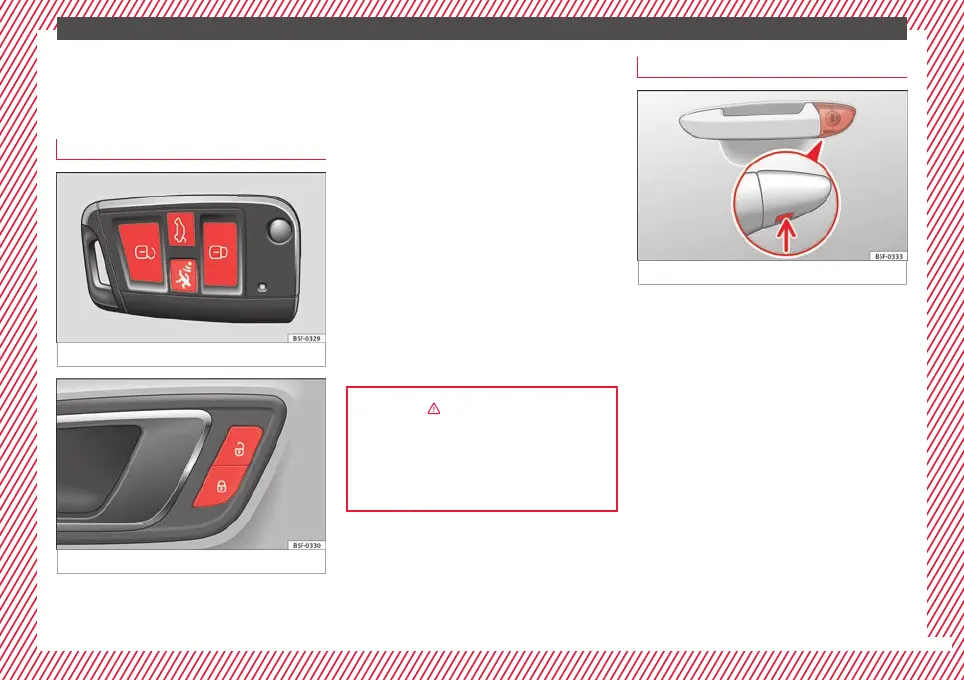
Fig. 1 Remote control key: buttons.
Fig. 2 Driver door: central locking switch.
Locking and unlocking the vehicle using the
k
ey
●
L
oc
king: press the ››› Fig. 1 button.
●
Locking the vehicle without activating the
anti-theft system: Press the ››› Fig. 1 button
for a second time within 2 seconds.
●
Unlocking: press the ››› Fig. 1 button.
●
Unlocking the rear lid: Hold down the
››› Fig. 1 button for at least 1 second.
Locking and unlocking with the central lock-
ing switch
●
Locking: press the ››› Fig. 2 button. None
of the doors can be opened from the outside.
The doors can be opened from the inside by
pulling the inside door handle.
●
Unlocking: press the ››› Fig. 2 button.
››› in Description on page 125
››› page 125
››› page 15, ››› page 16
Unlocking or locking of driver door
Fig. 3 Driver door lever: hidden lock cylinder.
If the central locking system should fail to op-
er
at
e, the driv
er door can still be locked and
unlocked by turning the key in the lock.
As a general rule, when the driver door is
locked manually all other doors are locked.
When it is unlocked manually, only the driver
door opens. Please observe the instructions
relating to the anti-theft alarm system
›››
page 125.
●
Unfold the vehicle key blade
›››
page 126.
●
Insert the key shaft into the lower opening
in the cover on the driver door handle
››› Fig. 3 (arrow) then remove the cover up-
wards.
●
Insert the key blade into the lock cylinder
to unlock or lock the vehicle.
»
15



 To Next Page