Short user manualIntruder alarm system
KM24, KM24A, KM24G keypadKM24, KM24A, KM24G keypad
Page 2
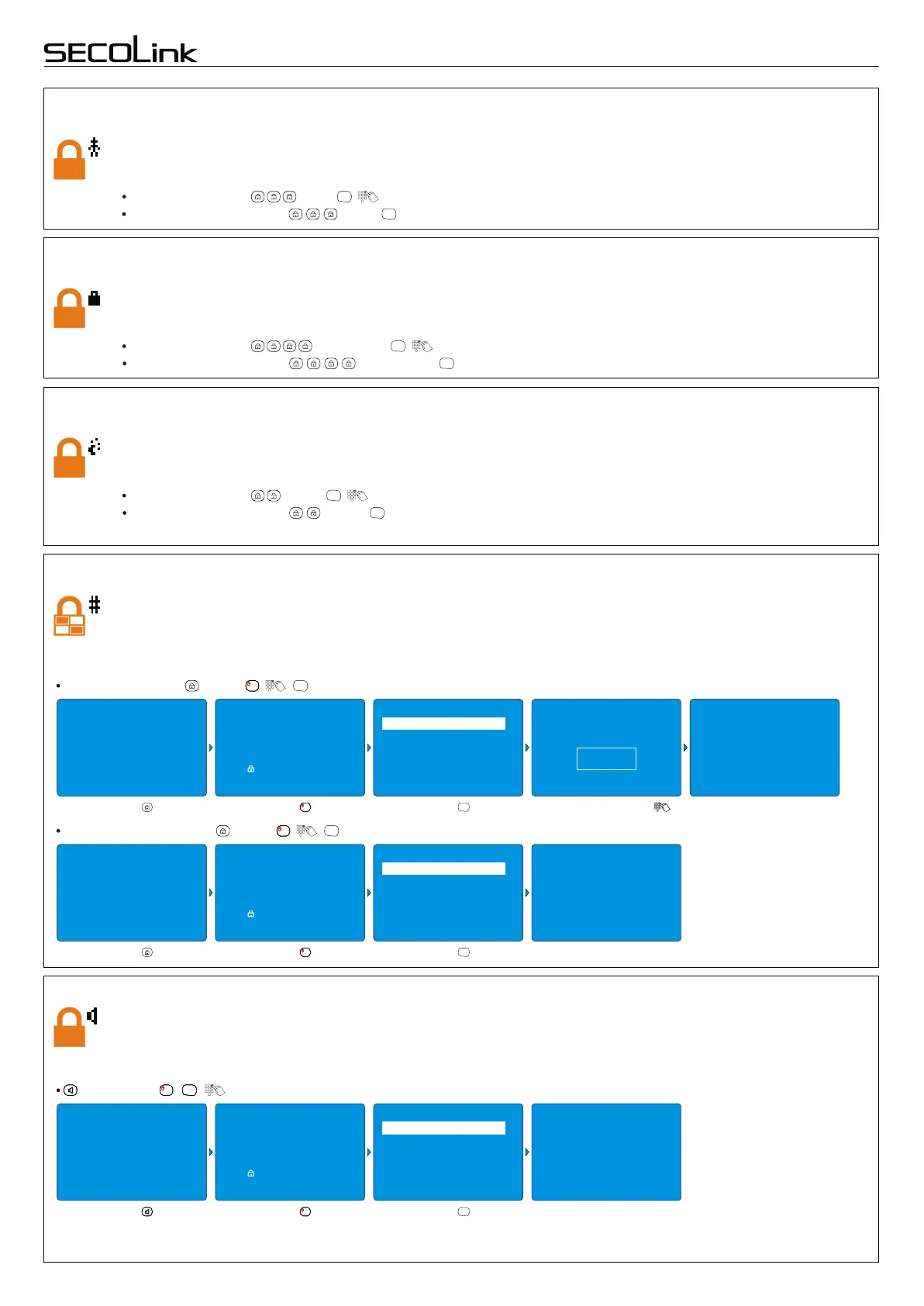
Stay arming mode
Use this mode when you are staying at home, but expect someone to use the entrance door later. Interior zones will
not be protected and you may freely move throughout the premises. Late arrivals can enter through the designated
entrance door without causing an alarm, but they must disarm the system within the entry delay period or an alarm
will occur. There are two ways to arm your security system's Stay arming mode:
for EU countries – , Stay , .
for non-EU countries – , Stay .
ENT
ENT
Max Away arming mode
Use this mode when no one will be staying on the premises for a long period of time (e.g., vacations). Close all
protected perimeter windows and doors before arming. When armed in Max Away mode, all zones will be secure,
entry delay will turn off, and the system will sound an alarm if a protected zone is violated. There are two ways to arm
your security system's Max Away arming mode:
for EU countries – , Max Away , .
for non-EU countries – , Max Away .
ENT
ENT
Night arming mode
Use this arming mode when you are staying inside the premises and require increased security. Interior zones are
disarmed and you may freely move throughout the premises. In the event of someone opening the door there will
not be an entry delay and the alarm will sound. This arming mode is effective when doors and windows are secured
with opening sensors, or glass break detectors are installed. There are two ways to arm Night Arming mode:
for EU countries – , Night , .
for non-EU countries – , Night .
ENT
ENT
for EU countries – , Away , , .
1111
ENT
for non-EU countries – , Away , , .
1111
ENT
Partial Arming
Partitions allows you to break up a large area into smaller sections. Use this arming mode to arm certain areas of the
premises while leaving other areas disarmed, or to limit other user’s access in specific areas. For example: an alarm
system is installed in a two-story house. During night time the ground floor isn't being used and all sensors of this
partition are armed. There will be an entry delay in the event of someone opening the door. Below is an example of
how to arm a first partition (one of two) in Away mode.
10/02 . . 25°C 14:02
10/02 . . 25°C 14:02
2nd Floor
1st Floor
READY TO ARM
10/02 . . 25°C 14:02
2nd Floor
1st Floor
READY TO ARM
10/02 X . 25°C 14:02
2nd Floor
1st Floor
READY TO ARM
2nd Floor
1st Floor
READY TO ARM
Press [ ] to select mode
Press [ ] to select mode
Press [ ] to select mode
Press [1]..[4] to select part.
Press [1]..[4] to select part.
Press [1]..[4] to select part.
Press [ENT] to arm
Press [ENT] to confirm
Press [ENT] to arm
2 2nd Floor
2 2nd Floor
2 2nd Floor
Partitions
Partitions
Partitions
Away
Pre-Alarm
Away
Arming
SOUNDS
Arming
To Exit
30
seconds
Enter PIN
ÜÜÜÜ
Press the key.
Press the key.
Press the key.
Press the key.
1111
Press the key.
1111
Press the key.
1111
Press the key.
ENT
Press the key.
ENT
Press the key.
ENT
Enter your PIN code . Leave the premises.
To Exit
30
seconds
Leave the premises.
1 # 1st Floor
1 X 1st Floor
1 # 1st Floor
Arm
Arming and disarming of security barrier, “Pre-Alarm” mode
Microwave or infrared rays based security barriers, outdoor PIR detectors, which are connected to the system, can
be armed by Pre-alarm mode. In the event of someone crossing this electrical barrier the system will sound an
alarm without sending an alarm message to Central Monitoring Station. The Pre-alarm mode can be turned on and
off the same way. Please follow the instructions below:
, Pre-Alarm , , .
1111
ENTENTENTENT
Pre-alarm is turned on in
1st partition.


 To Next Page
 Loading...