, Zone bypass, , ... or , and ,
B
!
BY
B
!
BY
B
!
BY
B
!
BY
0000
9
WXYZ
9
WXYZ
9
WXYZ
9
WXYZ
####
ENTENTENTENT
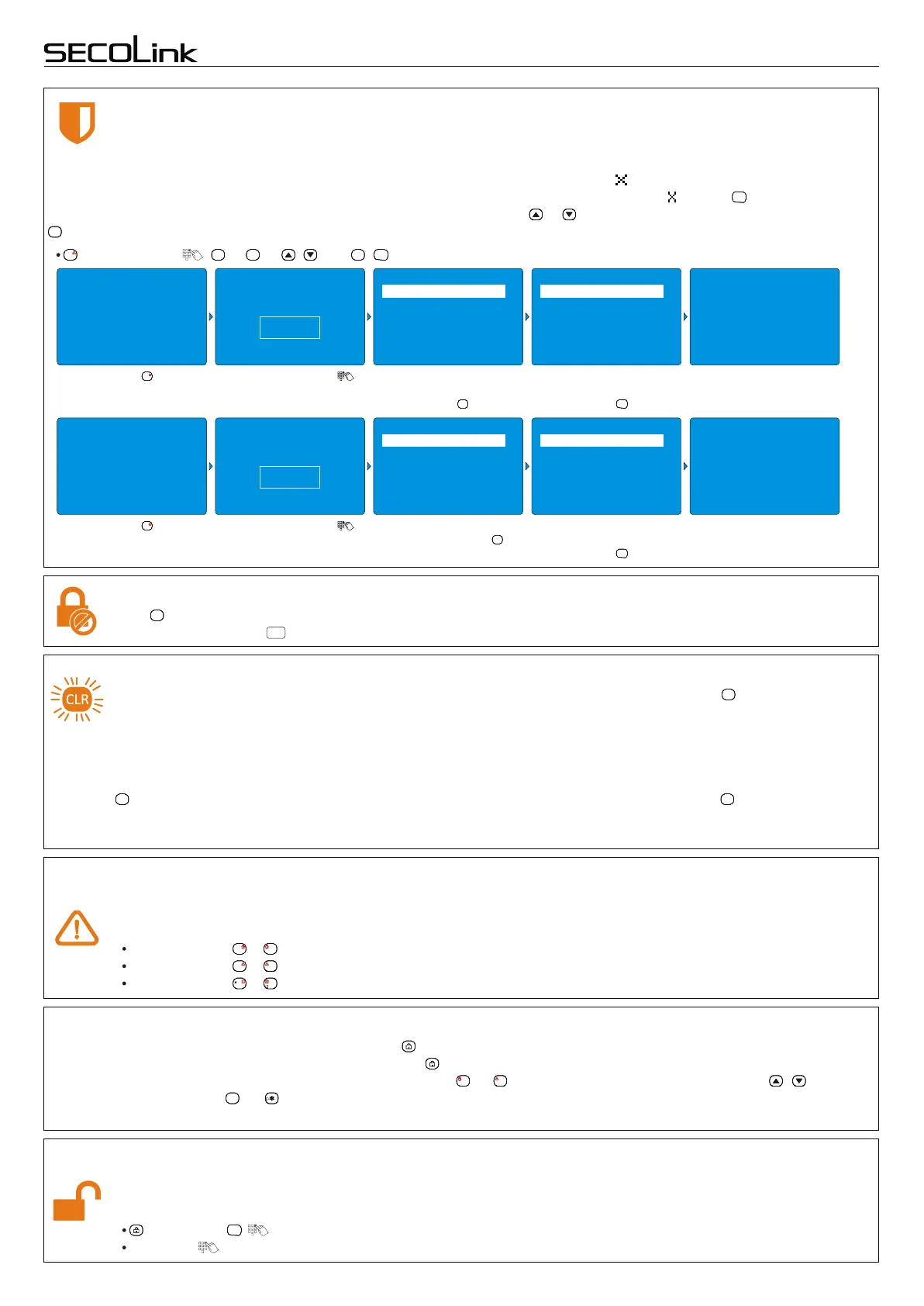
Bypassing zone
Bypassing a zone allows you to leave a door or window open while arming the rest of your security system. There
are two different types of bypass: temporal or permanent. Temporal bypass is used for a one time arming and
Short user manualIntruder alarm system
KM24, KM24A, KM24G keypadKM24, KM24A, KM24G keypad
disarming cycle. Permanent bypass is used until the user unbypasses the zone. Enter the zone number you would like to
bypass. THIS MUST BE A TWO DIGIT NUMBER. The zone will be marked as " ". To bypass the zone for a long time
(permanent) the last number should be pressed and held for 2 sec. A zone will be marked as " ". Press when all zones are
marked. The same actions can be performed by choosing the zone with or keys and by marking a chosen zone with the
key (short press - temporal, long - permanent). To b ypass follow the steps below:
ENTENTENTENT
####
10/02 . . 25°C 14:02
2nd Floor
1st Floor
READY TO ARM
Bypass
Bypass
Zone
Zone
10/02 . . 25°C 14:02
2nd Floor
1st Floor
READY TO ARM
Press the key.
B
!
BY
B
!
BY
B
!
BY
B
!
BY
10/02 . . 25°C 14:02
Entry Door
BYPASSED
Press the key.
B
!
BY
B
!
BY
B
!
BY
B
!
BY
Enter your PIN code .
Enter your PIN code .
Zone named Entry Door is
violated (!). To bypass
press the key.
####
Zone named Entry Door is
violated (!). Press the key
and hold it for 2 seconds.
####
Zone is bypassed
temporarily.
Press the key.
ENTENTENTENT
Zone is bypassed
permanently.
Press the key.
ENTENTENTENT
2 Hallway
2 Hallway
2 Hallway
2 Hallway
3 Living room
3 Living room
3 Living room
3 Living room
4 Bedroom
4 Bedroom
4 Bedroom
4 Bedroom
5 Kitchen
5 Kitchen
5 Kitchen
5 Kitchen
6 Bathroom
6 Bathroom
6 Bathroom
6 Bathroom
Zones
Zones
Zones
Zones
1 !Entry Door
1 ! Entry Door
1 xEntry Door
1 X Entry Door
Enter PIN
ÜÜÜÜ
Enter PIN
ÜÜÜÜ
10/02 . . 25°C 14:02
Entry Door
BYPASSED
Abort arming
Clear key is used for selecting and aborting procedures. For example, if exit delay is in process and you want to
abort arming, press the key and enter your PIN code.
CLRCLRCLRCLR
CLR
Arming system with troubles
EU standards do not allow the use of a troubled security system. Green LED light of the key will turn on and
arming of the system with previously described ways will not be possible. It is necessary to immediately eliminate
system troubles, inform CMS, and the company that had installed your system. The system detects troubles of its
CLRCLRCLRCLR
own modules as well as other common problems such as 230V disappearance in AC line, a disconnected phone line due to
repairs, or a battery discharge. In exceptional cases it is possible to bypass certain troubles for a short period of time and arm
the system as usual. To arm a system with troubles please do the following:
Press the key once and a message describing system troubles will be shown on the display. Press again and the Green
LED light will start to blink rapidly. Blinking duration is 30 seconds and during this time it is possible to activate Arming of your
system as usual.
CLRCLRCLRCLR CLRCLRCLRCLR
Emergency keys
To activate an emergency function press at once two event specific keys listed below and hold it for at least 1
second. Premises must be secured by CMS for these functions to activate. An audible emergency loud siren will
occur showing a related message on the keypad screen.
Fire alarm: + .
Medical alarm: + .
Panic alarm: + .
AAAA 1111
B
!
BY
B
!
BY
B
!
BY
B
!
BY
4
GHI
!
4
GHI
!
4
GHI
!
4
GHI
!
CCCC
7
PQRS
7
PQRS
7
PQRS
7
PQRS
To Disarm the System Using Your PIN Code Upon Entering the Premise
Entry delay gives you time to disarm the system when you enter through the designated entrance door. You must
disarm the system before entry delay period ends to avoid an alarm occurrence. There are two ways to disarm the
system using your PIN code:
, Disarming, , .
PIN code: .
ENTENTENTENT
Ways of disarming
Disarming can be done in two ways: with a special key or by entering a PIN code. User has an option to disarm all or
selected partitions when disarming is activated with the key. For partial disarming it's necessary to unmark the partitions
which will be disarmed (unmark the partitions by pressing ... keys or select partitions by pressing , keys and
unmark/mark by pressing , or keys). All partitions which are controlled by the user will be disarmed when disarming is
activated by entering a PIN code.
1111
4
GHI
!
4
GHI
!
4
GHI
!
4
GHI
!
####
Page 3


 To Next Page
 Loading...