Short user manual
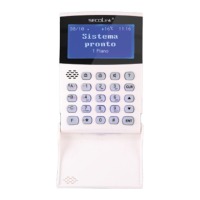
KM20B, KM20BT keypadsKM20B, KM20BT keypads
Intruder alarm system
Your security system includes a control panel, keypad and/or modules, various sensors and detectors. The keypads KM20B or KM20BT are
wired keypads and usually are mounted by the main entry/exit location. It can be used to arm/disarm and perform other system operations.
The alphanumerical LCD display and four LED indicators show the status from your security system. The keypads built-in buzzer indicates
entry/exit delay, chime and alarm situations. User interface menu, zones and events are displayed in English or other languages.
Away arming mode – A
Use this mode for premises protection when no one will be staying inside. When armed in Away mode, all zones will be secure
and the system will sound an alarm if a protected zone is violated. User must disarm the system within the entry delay period or
an alarm will occur. There are three ways to arm your security systems Away arming mode:
Functional keys
(F-keys)
System's state
LED indicators
This key is used for zone review,
also for marking the partitions (areas)
and other elements of the system
(for example for marking a zone,
which will be bypassed)
pre-alarm
ready
trouble
armed
alarm
A
B
C
F
1
4
7
2
5
8
0
3
6
9
#
CLR
ENT
!!
!!
MAS-800
Pre-alarm / Ready to
arm LED indicator
Main menu
navigation keys
There are 4 partitions in the system:
- the first partition is armed in the Stay mode,
- the second partition is armed in the Night mode,
- the third partition is armed in the Max Away mode,
- the fourth partition is armed in the Away mode.
Status of the system: Entry Doors are open.
Date Time
Emergency keys
This key is used for partition review,
also for marking all partitions or
selecting another element
(e.g., selecting a user)
Status of the system: SYSTEM IS ARMED
There is 1 partition in the
system. This partition isn’t
armed and there is one
zone, which is being violated.
Environment temperature
(for KM20BT)
Functional keys for quick and comfortable control of the system
SECOLINK security system comes with a standard set of function keys (F- keys) described below. You will be able to carry out most
frequently used functions by the use of one or two buttons. This will allow you to avoid system management via Menu. During the
installation you will have an option to create individual F- keys, which can be adapted for the needs of the protected building and the user.
To view the current list of F - keys, press key, and then keep pressing and keys.
F
12/09 08:11 ....
READY TO ARM
12/09 08:11:21 !
! Entry doors
o
+22 C 08:11
SYSTEM IS ARMED
Ways of arming
Use to activate a function which is controlled by F-key, use key to exit the F - key menu.
ENT
CLR
The system can be armed in three ways: F - key, via Menu, or by entering a PIN code (symbol is used to prompt you to enter your PIN
code). System functions, which are controlled by F-key, can be activated by pressing F-key and , or by pressing and holding the last
letter/number of the F-key combination. When Arming is activated via Menu, it is necessary to mark the partitions (areas), which will be
armed (use keys , , , or to mark a particular partition (area), or use to mark all partitions and proceed by confirming the
selections with key ). If arming is activated by entering a PIN code, your system will be armed in Away mode.
ENT
1
2 3
4
!!
ENT
12/09 08:11 ..
READY TO ARM
Arming:
PIN:ÜÜÜÜ
To Exit:
030 seconds
Main Menu:
| Arming }
Arming:
| Night }
Arming:
| All partitions }
Enter your PIN code .
Press key.
ENT
Press key.
ENT
Press key.
F-key: for EU countries – , .
A
ENT
PIN code: .
via Menu: , Arming , All partitions , .
ENT ENT ENT
12/09 08:11 ..
READY TO ARM
PIN code entering.
Arming:
PIN:ÜÜÜÜ
F - key A
AWAY, arming
Press key.
A
12/09 08:11 ..
READY TO ARM
Press key.
ENT
AWAY, arming To Exit:
PIN:ÜÜÜÜ 030 seconds
Enter your PIN code .
Press key.
ENT
Enter your PIN code .
F - key F F - key A F - key AA F - key AAA
AWAY, arming STAY, arming MAX AWAY, arming
Press key.
F
12/09 08:11 ....
READY TO ARM
Press key. A - Away arming mode.
Press key.
AA - Stay arming mode.
Press key.
AAA - Max Away arming
mode.Press key.
Page 1
Leave the premise.
To Exit:
030 seconds
Leave the premise.
Leave the premise.
F-key: for non EU countries – .
A
ENT
F - key A
AWAY, arming
Press key.
A
12/09 08:11 ..
READY TO ARM
Press key.
ENT
To Exit:
030 seconds
Leave the premise.

 Need help?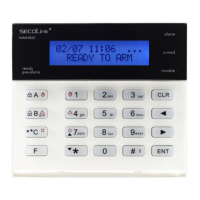

 To Next Page

 General