Kodinis Raktas UAB, manufacturer of SECOLINK Intruder Alarm System, offers a Warranty for a term of twenty-
four months. It declares, that products KM24, KM24A, and KM24G comply with essential EU directives and EU
standards EN 50131-1, Grade 1 for wired & wireless zones intruder alarm systems, Grade 2 for wired zones
intruder alarm systems, Environmental Class II; EN50131-3. For more information visit manufacturer’s website at
www.kodinis.lt or www.secolink.eu for a complete text of declaration. SECOLINK Intruder Alarm System is
designed and manufactured in Lithuania.
System compliance and warranty
Short user manualIntruder alarm system
Communication and messaging (GSVx or VIDNET module must be installed)
This menu allows the user to add phone numbers to receive SMS and call notifications.
Number – phone number must be entered in the international format, "+" sign is added automatically.
Smartphone – in this menu the user may specify the SECOLINK PRO application that is used to control the
system. Possible setting options are described below:
No – SECOLINK PRO application is not used.
Android – SECOLINK PRO application for Android OS is used.
Iphone – SECOLINK PRO application for Apple iOS (iPhone) is used.
Push notifications – a message or an alert delivered by a centralized server to endpoint devices. This
setting is mandatory for iPhone SECOLINK PRO application users who paid for this additional functionality.
This communication uses data service and charges may apply.
SMS when armed - SMS notification that the system is armed.
SMS when disarmed - SMS notification that the system is disarmed.
SMS when alarming – SMS notification in the event of a triggered alarm.
Call when alarming – notification via a phone call in the event of a triggered alarm (GSVx only). Incoming
call must be acknowledged either by pressing 0# or by entering PIN#.
Mandatory call – notification via a phone call in the event of a triggered alarm (GSVx only). Mandatory call
differs from Call when alarming setting by enabling the user to receive a call even if another user in the list
acknowledged the call by pressing 0# or by entering the PIN#.
SMS for troubles – SMS notification when the system has any troubles (e.g. battery low).
Testing SMS – test notifications via SMS.
, Settings , Cell phones (GSM) , .
ENTENTENTENT ENTENTENTENT ENTENTENTENT
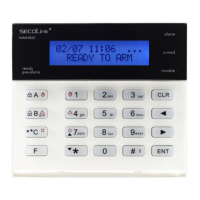
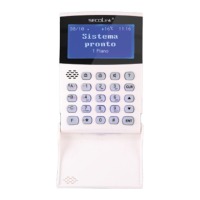
KM24, KM24A, KM24G keypadKM24, KM24A, KM24G keypad
System control via TCP/IP (GSVU, GSV6U, LAN800 or VIDNET must be installed)
ALARMSERVER.NET is simply a service platform that keeps in sync end user devices which have the SECOLINK PRO app
installed with the alarm system. Status (armed/disarmed, alarms, troubles), temperature in premises (measured by
temperature sensors BT1, BP1, or keypads), and video recordings made by VIDNET can all be monitored using the service.
This communication uses data service and charges may apply.
, Settings , ... www.alarmserver.net, .
ENTENTENTENT ENTENTENTENT ENTENTENTENT
Registration on server – this menu is used to register your intruder alarm system on ALARMSERVER.NET and to send any
settings related to communication. It is mandatory to register your system with a server, if SECOLINK PRO application will be
used to control the system via TCP/IP. Registration should be done when all below mentioned settings are programmed.
After a successful registration go to www.alarmserver.net to create a free account. Important! The registration on server
process should be repeated if any settings described below are changed.
Reporting – in this menu the user can change settings for reports on ALARMSERVER.NET.
Every event – to view present status of the system, all new generated events (e.g. arming/disarming, alarms) should be
sent to ALARMSERVER.NET. This communication uses data service and charges may apply.
TCP control – this setting must be enabled, if SECOLINK PRO application will be used to control the system via TCP/IP.
Module will have a keep-alive connection with a server to ensure real - time control.
Privacy settings – in this menu the user can change privacy settings.
Report user names – selecting an option Yes will allow the system to send user names to ALARMSERVER.NET, which
can be viewed in SECOLINK PRO application. The application will show default system names such as User 01, User 02, if
the user will select an option No.
Report zone names – selecting an option Yes will allow the system to send the names of zones, partitions and other
information (except users names) to ALARMSERVER.NET, which can be viewed in SECOLINK PRO application. The
application will show default zone names such as Zone 01, Zone 02, if the user will select an option No.
Save event log – selecting an option Yes will allow the user to view the saved system event log in the application. Event log
will not be seen with an option No.
Page 8
Rev.27/12/16_KF_P
Registration on serverwww.alarmserver.net www.alarmserver.net
GSV on system
Checking connectivity2 Send project to server 2 Send project to server
Connecting server3 Receive prj. from 3 Receive prj. from
Sending data4 Send event log 4 Send event log
Sending completed5 Send technical info 5 Send technical info
Alarmserver.net menu Reporting settings. Registering on
ALARMSERVER.NET.
Privacy settings. Registration completed.
1 Registration on server 1 Registration on server
Reporting Privacy settings
1 Periodic test
1 Report user names
2 Technical info 2 Report zone names
3 Every event 3 Save event log
4 Event log
5 TCP control
Disabled
Ye sEvery 10 min
No
Ye s
Enabled
Yes
Yes
6 Reporting 6 Reporting
SECOLINK PRO
app on Google
play
SECOLINK PRO
app on iPhone
App Store
Secolink Pro


 To Previous Page
 Loading...