Press [ENT] to confirm Press [ENT] to confirm Press [ENT] to confirm
Press [?] for next settings Press [?] for next settings Press [?] for next settings
Summary
System
Summary
System
Distributor
Interface settings
7 Show info bar
Show Alarms
Show Modules Mess.
Show WL Zone Temp.
Show PGM status
Show Tech. Info
Yes
Yes
No
Yes
Yes
Yes
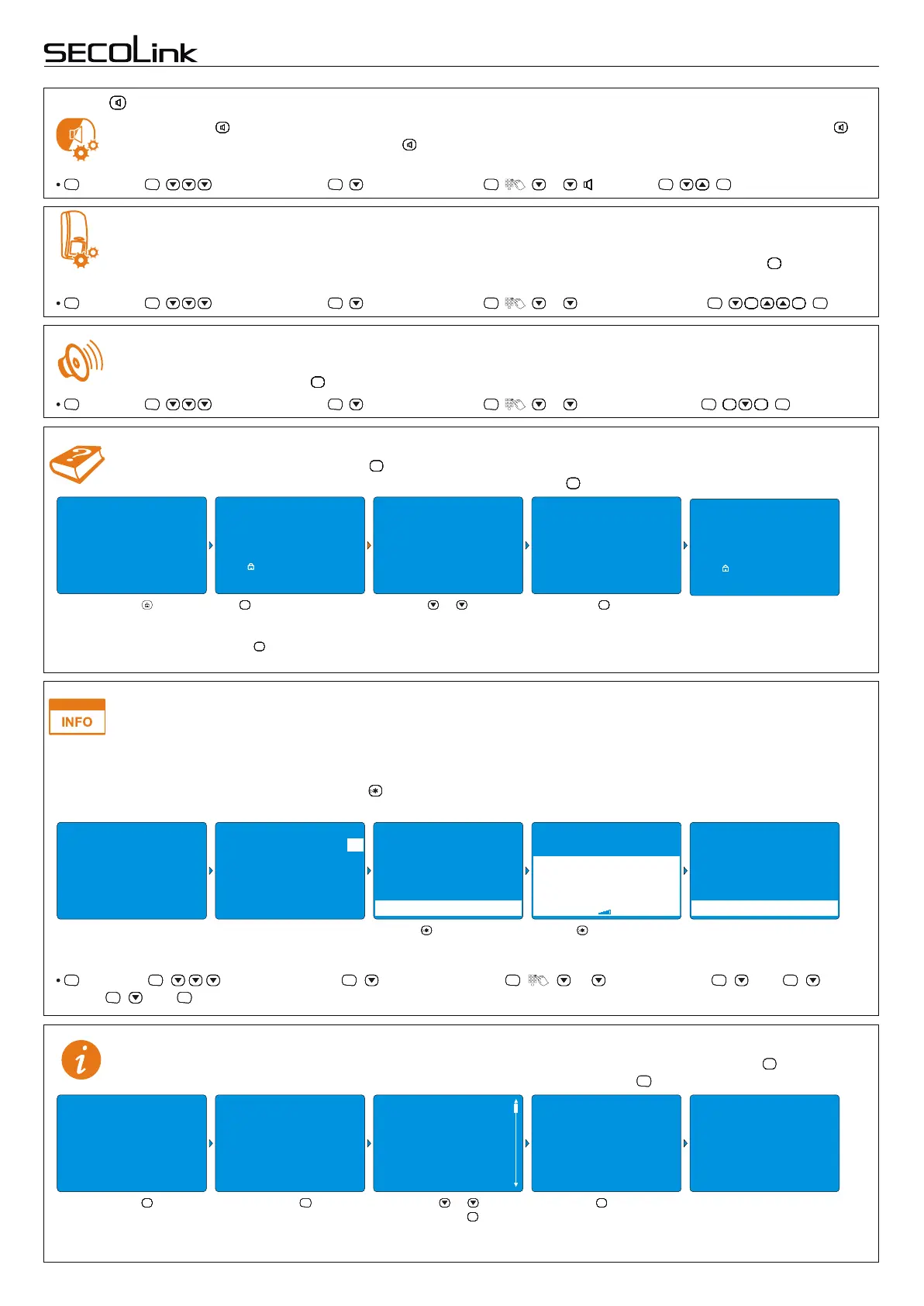
key LED
Backlight of the key can be customized to match different situations that occur. Available settings: Off – the key
LED is always Off ; Pre-Alarm status – the key LED is steady On when the partition is secured with Pre-alarm
mode On.
, Settings , Keypad Settings , Light & Indication , , ... [ ] key LED , , .
ENTENTENTENT ENTENTENTENT ENTENTENTENT ENTENTENTENT ENTENTENTENT ENTENTENTENT
Entry/exit sounds
In this menu it is possible to turn off entry/exit sound countdown on certain keypads where it is not needed, for
example, in the bedroom. The key is used to mark/unmark the partition.
################
, Settings , Keypad Settings , Light & Indication , , ... Entry/Exit sounds , , .
ENTENTENTENT ENTENTENTENT ENTENTENTENT ENTENTENTENT ENTENTENTENT
################ ################
ENTENTENTENT
Short user manualIntruder alarm system
Events from zones
This menu is visible if the setting By zone is used for controlling the backlight of the keypad. In this menu zones work
as a trigger to turn on the backlight of LCD and/or keypad keys should be marked with "+" sign. The key is used to
################
, Settings , Keypad Settings , Light & Indication , , ... Events from zones , , .
ENTENTENTENT ENTENTENTENT ENTENTENTENT ENTENTENTENT ENTENTENTENT
################ ################
ENTENTENTENT
Help texts
The keypad is equipped with a special key and its backlight blinks if there is some additional information. To find
information about how to manage the system or a problem, press the key.
????????
????????
, Settings , Keypad Settings , Interface settings , , ... Show Info Bar , Yes , Show
Alarms , Yes .
ENTENTENTENT ENTENTENTENT ENTENTENTENT ENTENTENTENT ENTENTENTENT ENTENTENTENT
ENTENTENTENT ENTENTENTENT
Info bar (KM24G)
KM24G keypad has a two line information bar at the bottom of the LCD screen. It displays information including the
alarm memory, measured temperature by SECOLINK BP1 or BT1 wireless sensors, the statistics of
System summary, technical, distributor and installer information can be found by pressing the key when the
keypad is displaying the main view. Choose the corresponding menu and press .
????
ENTENTENTENT
System information
KM24, KM24A, KM24G keypadKM24, KM24A, KM24G keypad
Page 7
mark/unmark the zone.
10/02 . . 25°C 14:02
10/02 . . 25°C 14:02
10/02 . . 25°C 14:02
10/02 . . 25°C 14:02 10/02 . . 25°C 14:02
2nd Floor
1st Floor
READY TO ARM
2nd Floor
1st Floor
READY TO ARM
2nd Floor
1st Floor
READY TO ARM
2nd Floor 2nd Floor
1st Floor 1st Floor
READY TO ARM READY TO ARM
Press the key.
Info bar is not enabled.
Press the key.
????????
Press or key to
navigate (if there are
additional text).
Press to expand the
info bar.
Press to exit.
CLRCLRCLRCLRCLRCLRCLRCLR
Press to collapse the
info bar.
Arming mode Away.
Use this mode for premises Press [CLR] to exit.
protection when no one will
be staying inside. All zones
will be protected after
arming. There will be an
entry delay after using a
door.
Press [ ] to select mode
Press [1]..[4] to select part.
Press [ENT] to arm
Away
Press [ ] to select mode
Press [1]..[4] to select part.
Press [ENT] to arm
Away
Arming
Arming
The key will start to blink.
It means that a help text is
available for this menu.
Press key to read the
help text.
????????
????????
Select information which
will be seen in the
information bar.
Press the key.
ENTENTENTENT
Press for next
information menu.
????????
communication between SECOLINK wireless sensor and a receiver, PGM output status (On/Off), GSM signal strength,
messages from modules, and etc. The information will rotate by appearing on the LCD screen every 3 seconds if there are
more than two lines of information text. Use the key to expand/collapse the bar if it is desired to view all the information at
once.
10/02/2015 13:12 Burglar alarm, 1st Floor 10/02/2015 13:12 Burglar alarm, 1st Floor
10/02/2015 13:12 Burglar alarm, 2nd Floor 10/02/2015 13:12 Burglar alarm, 2nd Floor
Living room +24°C
SERIAL Reporting Enabled
GPRS Reporting Enabled
GSM signal strength
Bedroom +25°C
10/02/2015 13:12 Burglar alarm, 2nd Floor
10/02/2015 13:12 Burglar alarm, 1st Floor
System Summary
BI: 1254369872
Modules 10
0. P64 v.0.06b
1. KM24G v.3.018
2. KM24G v.3.018
3. KM24G v.3.018
Press or to
navigate. Press to exit.
CLRCLRCLRCLRCLRCLRCLRCLR


 To Next Page
 Loading...