MAIN MANNUAL
Watch face move left is the Main manual, Main Manual up
and down will show differen t func tion i con ( Cu stom
message, Notification, Training, Ac tivi ty rec ord, H eart R ate,
Blood pressure, Sleep monito r,We athe r,Sto p watc h,Fi nd
my phone,Setting)
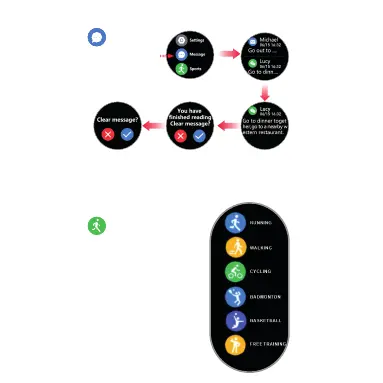
Press “ message” Move up and down yo u can re ad
all the message. Move right back to main manua l. Mov e
left “ Message delete” Press “Yes” will del ete al l mess age.
Same motion as “ Notification”.
Mess ag e
Spor ts
Reco rd ing
Hear t Ra te
Slee p
Weather
Stop wa tc h
Find P ho ne
Sett in gs
Bloo d Pr essure
Mess ag eMess ag e
Message
One touch to read
Notification Message
Sports
You ca n pau sed the e xerci se by
mov e left
Mov e UP to end y ou r eco rding
Press “ Training” Move up
and down select your motion
sport. Move right back to
main manual. Move
left “ Message delete”
Press “Yes” will delete all
Read.Press “ Yes”
again to clear all your
record.



 To Next Page