Sleep
Press Slee p Mon itor icon, We ar wa tch on sleepin g tim e
conne ct wi th th e APP, Sleep Re cor d will show detail on t he
Phone AP P
Weathe r
Press Wea ther icon, Rea d tod ay we ather (Keep yo ur wa tch
conne ct wi th th e APP)
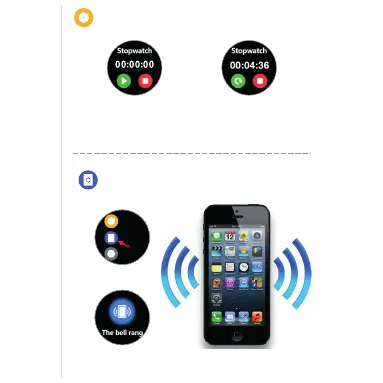
Stopwatch
Press Stop Watch ic on, P res s “strat” Start on co unt ing t ime
1/100 seco nd. P ress “ Stop” to recor d or Pr ess “ Resume”
to start cou nti ng ag ain
Find Phone
Find Phone
The watch will show “The bell rang”
icon. Than your Phone will Virbate.
Fin d Phone
Set tings
Sto pwatc h
One touch on Find Phone
Press Heart Rate icon, Start heart rate record, Wear position
must right. After 12 second Heart Rate record will show.
Heart Rate
Cronometro
Trova telefono
Trova telefono
Premere l’icona del cronometro, premere “Start” per iniziare il conteggio a 1/100
di secondo. Premere “Stop” per segnare il tempo o “Riprendi” per ricominciare
il conteggio
Toccare una volta su
Trova telefono
L’orologio mostrerà l’icona
della campanella che suona.
Il telefono inizierà a vibrare.



 To Next Page