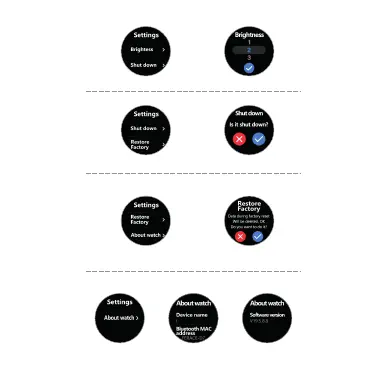
Pres s Abou t watch i con , Read wa tch nam e, Bl uetoo th MA C
addr ess a nd Soft war e versi on
Pres s Fac tory mo de ic on, Sel ect tic k to re set you r wat ch in
Fcat ory M ode
Settin gs
Sed ent ary
mod e
Do not
dis tur b
Bri ght nes s
Shu t down
Lau age s
Res tor e
Fac tor y
Abo ut watch
Setting Manual
Fin d Phone
Set tings
Sto pwatc h
Settin g Sedantary Mode
Settin g Do Not Disturb Mode
Pres s sma ll Butt on to tur n on/ off Seda nta ry or Do No t Dis turb Mo de
Settin g Brightness Mode
Pres s Bri ghtne ss ic on, Sel ect the b rig htnes s of yo ur scre en
Pres s Wa tc h OFF i con, Se lec t tick to t urn o ff your wa tch
Shut Down
Restor e Factory
Restor e Factory



 To Next Page