Press About wat ch ic on, R ead w atc h name, Bluetoo th MA C
address and So ftw are v ers ion
Press Fac tor y mod e ico n, Se lect tick to rese t you r wat ch in
Fcatory M ode
Settings
Sed ent ary
mod e
Do not
dis tur b
Bri ght ness
Shu t down
Lau age s
Res tor e
Fac tor y
Abo ut watch
Setting Manual
Fin d Phone
Set tings
Sto pwatc h
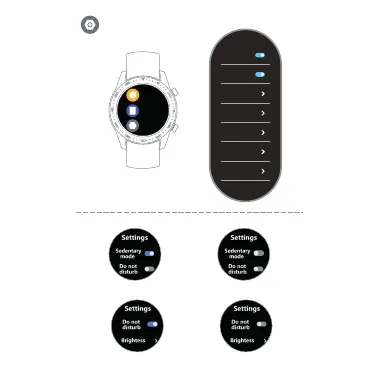
Setting Sedantary Mode
Setting Do Not Dis turb Mode
Press sma ll Bu tto n to tu rn on /off Sedantary o r Do No t Dis tur b Mod e
Setting Bright ness Mode
Press Bri ght nes s ico n, Se lec t the brightnes s of yo ur sc ree n
Press Wa tch O FF icon, Select tick t o tur n off yo ur wa tch
Shut Down
Restore Factory
Restore Factory



 To Next Page