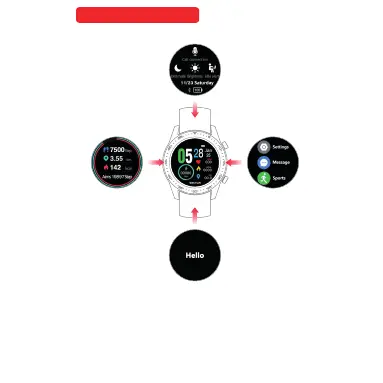
Quick Change Function
Watch face mode left move Sport Mode , Right move
Main Manual. Up Move Custom message, Down mo ve
Fast change Function mode.
con nect
PHONE CONNECT:
Press grey Microphone icon, tu rn on mo bile B luet ooth s earc hing
“ WATCH BRY03 Call” press to connect. The Micr opho ne ico n will
turn white color. The watch Connected.
BRIGHTNESS :
Press SUN icon brightness control had 3 leve l. Sel ect 1, 2 or 3 for
you choose.
NO DISTURBANCE :
Press the moon icon,Trun on is white colou r, Trun off i s grey
colour
LONG SIT REMIND:
Press the SITTING icon,Trun on is white colour, Trun off is grey
colour
Quick Change Function
One touch on
Call connection
One touch off
Call connection
Phon e BL E
Blu etoot h
S02 CA LL
Schnellwechselfunktion
Im Zifferblattmodus nach links streichen ruft des Sportmodus auf, nach rechts
streichen führt zum Hauptmenü. Nach oben streichen führt zu benutzerdefinierte
Nachricht, nach unten streichen führt zur Schnellwechselfunktion.



 To Next Page