MAIN MANNUAL
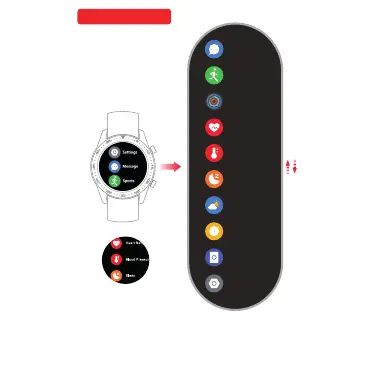
Watch face move left is the Main manual, Main Manual up
and down will show differen t func tion i con ( Cu stom
message, Notification, Training, Ac tivi ty rec ord, H eart R ate,
Blood pressure, Sleep monito r,We athe r,Sto p watc h,Fi nd
my phone,Setting)
Press “ message” Move up and down yo u can re ad
all the message. Move right back to main manua l. Mov e
left “ Message delete” Press “Yes” will del ete al l mess age.
Same motion as “ Notification”.
Mess ag e
Spor ts
Reco rd ing
Hear t Ra te
Slee p
Weather
Stop wa tc h
Find P ho ne
Sett in gs
Bloo d Pr essure
Mess ag eMess ag e
Message
One touch to read
Notification Message
Sports
You ca n pau sed the e xerci se by
mov e left
Mov e UP to end y ou r eco rding
Press “ Training” Move up
and down select your motion
sport. Move right back to
main manual. Move
left “ Message delete”
Press “Yes” will delete all
Read.Press “ Yes”
again to clear all your
record.
HAUPTMENÜ
Wenn Sie das Zifferblatt nach links schieben, wird das Hauptmenü angezeigt.
Wenn Sie das Hauptmenü nach oben oder unten schieben, werden verschiedene
Funktionssymbole angezeigt (Benutzerdefinierte Nachricht, Benachrichtigung, Trai-
ning, Aktivitätsaufzeichnung, Herzfrequenz, Blutdruck, Schlafüberwachung, Wetter,
Stoppuhr, Telefon suchen, Einstellungen).



 To Next Page