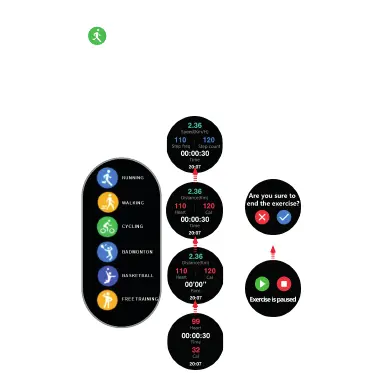
Press “ Training icon” Go in the Train ing se lect ( Runn ing,
Walking, Cycling, Badminton, Basketbal l, Fre e Train ing)
Move UP and Down to Select. Left Move back Main
Manual. Press icon show hear rate ,time reco rd, Ca lori e,
Distance record. Press top button Stop or Continues . Pr ess
select button to closed.
Press Training record ico n, Rea d Step c ount er, Dis tanc e,
Calorie, Right move back to main manua l
You ca n pau sed the e xerci se by
mov e left
Mov e UP to end y ou r eco rding
Sports
Recording
Blood Pressure
Press Blood Pressure icon, Start Blood Pre ssur ee rec ord,
Wear position must right. After 12 second
Blood Pressure record wi ll sho w.
DISCLAI MER B LOOD PRESSURE
The metho d of c ap tu ri ng t he t hr ou gh a n op ti cal sensor us ed b y th is S ec to r wa tc h do es n ot r ea ch the
level of pr ec is io n an d ac cu ra cy o f pr of es si onal medica l de vi ce , no r ca n it g ur an te e th e eq uivalent st ab le
reading s. T he w at ch c an no t replace a med ic al d ev ic e in i ts f un ct io no f de te cting or di ag no si ng
patholo gi es ,h ea rt o r ot he r di se as es .
if you susp ec t an y an om al y,a lways consu lt y ou r do ct or a nd i n ca se o f em er ge nc y, imm ed ia te ly c on ta ct t he
emergen cy s er vi ce y ou r ar ea .
Morella to g ro up a ss um es n o re po ns ib il it y for any cla im t ha t ma y ar i
se from the u se a nd /o r in te rp re ta ti on
that
the user of t he d ev ic e an d/ or t hi rd p ar ti es m ay make of th e bl oo d pr es su re i nf or ma ti on p ro vided by thie r
devices .
Drücken Sie auf das “Symbol Training”, um das Training auszuwählen (Laufen,
Gehen, Radfahren, Badminton, Basketball, freies Training). Streichen Sie für die
Auswahl nach OBEN und Unten. Streichen nach links führt Sie zum Hauptmenü.
Drücken Sie auf das Symbol, um die Herzfrequenz, die Zeitaufzeichnung, die Kalo-
rien und die Distanzaufzeichnung anzuzeigen. Drücken Sie die obere Schaltfläche
Stopp oder Fortsetzen. Drücken Sie die Auswahltaste zum Schließen.
Streichen Sie nach OBEN, um die
Aufzeichnung zu beenden.
Sie können die Übung durch
Streichen nach links pausieren



 To Next Page